对话框无障碍
为编辑器的对话框提供屏幕阅读器所需的名称和角色。没有它时,有些对话框会被读作菜单,其中的文本字段也没有名称("edit, blank");有了它,Insert Link 对话框就是一个名为 "Insert Link" 的对话框,其字段会被读作 "URL" 和 "Text"。它默认开启,不会改变任何可见的内容。
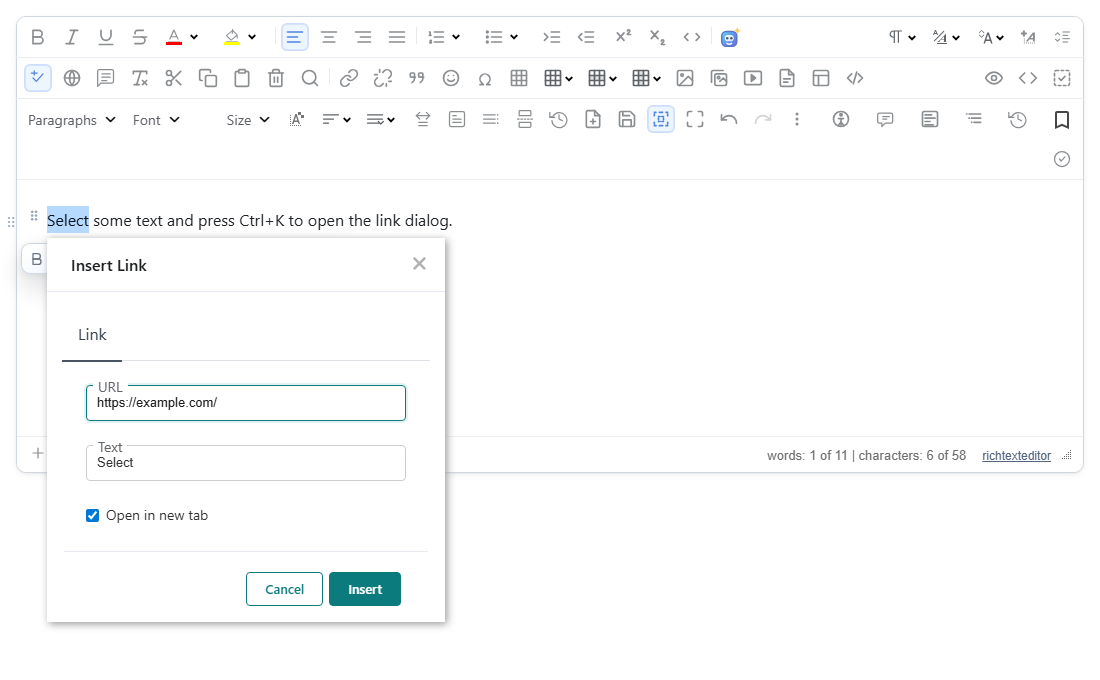
启用
该功能由 dialoga11y.js 插件提供(也包含在 plugins/all_plugins.js 中)。加载它即可:dialogA11y 默认为 true。它没有按钮。
<script src="/richtexteditor/rte.js"></script>
<script src="/richtexteditor/plugins/all_plugins.js"></script>
<div id="editor"><p>Select some text and press Ctrl+K to open the link dialog.</p></div>
<script>
var editor = new RichTextEditor("#editor", { toolbar: "full" });   // dialogA11y: false turns it off
</script>
选项
| 选项 | 默认值 | 作用 |
|---|---|---|
dialogA11y | true | false 会关闭该插件。 |
editor.applyDialogAccessibility() 会对页面上的每个弹出框运行一次,例如在您的代码向某个已打开的弹出框中添加了字段之后。
它做什么
插件会监视页面上编辑器的弹出框(rte-dropdown-panel、rte-dialog-float 和 .rte-panel-general)。对于每个带有标题栏(rte-dialog-header)的弹出框:
- 角色。带有标题且包含文本字段的弹出框,会得到
role="dialog",而不是核心赋予的role="menu",因为菜单中不能包含文本字段。带有标题但只列出命令的弹出框仍保持为菜单。对话框不会保留菜单的aria-orientation。 - 名称。如果对话框还没有名称,它会根据标题文字获得
aria-label,并去掉末尾的快捷键,例如 "(Ctrl+K)"。 - 字段标签。每个没有名称的字段都会获得一个
aria-label,优先取自它旁边可见的标签,因此读出的名称与屏幕上显示的一致。没有可见标签的字段,会依次根据字段的包装元素命名(rte-dialog-line-ALT变成 "Alternative text",rte-dialog-line-WIDTH变成 "Width",依此类推),然后是占位符,再然后是附近的文字,最后是对话框的名称。
没有标题栏的弹出框(例如颜色选择器和字体选择器)保持不变。唯一的例外是包含可见文本框的无标题菜单,它会变成 role="dialog"。
位于 rte-dialog-outer 框架中的对话框(例如用 editor.createDialog() 构建的 Insert Image、Insert Emoji 和图片编辑器)不会被修改:核心已经为它们提供了 role="dialog"、aria-label 和 aria-modal="true"。
我们检查过的对话框在插件关闭和开启时的无障碍树(以 Playwright 的报告为准):
| 对话框 | dialogA11y: false | 默认 |
|---|---|---|
| Insert Link(工具栏按钮) | role="menu",字段 textbox、textbox | role="dialog",字段 textbox "URL"、textbox "Text" |
| Insert Link(Ctrl+K) | dialog "Insert Link",字段 textbox、textbox | dialog "Insert Link",字段 textbox "URL"、textbox "Text" |
| Find and Replace | dialog "Find and Replace",字段 textbox、textbox | dialog "Find and Replace",字段 textbox "Find"、textbox "Replace" |
工具栏 Insert Link 对话框最终生成的标记(省略了样式和图标):
<rte-dropdown-panel role="dialog" aria-label="Insert Link" class="rte-panel-general rte-panel-insertlink">
  <rte-dialog-header><rte-dialog-header-text>Insert Link</rte-dialog-header-text></rte-dialog-header>
  …
  <rte-dialog-line-url …><rte-dialog-input-label>URL</rte-dialog-input-label><input type="text" aria-label="URL">…</rte-dialog-line-url>
  <rte-dialog-line-text …><rte-dialog-input-label>Text</rte-dialog-input-label><input type="text" aria-label="Text"></rte-dialog-line-text>
  …
</rte-dropdown-panel>
它不做什么
焦点处理由核心编辑器负责,而不是这个插件。我们在 Insert Link 对话框上分别在插件关闭和开启时进行了检查,结果相同:
- 焦点从 URL 字段开始(通过鼠标或 Ctrl+K 打开)。
- Tab 和 Shift+Tab 会在 URL、Text、Open in new tab、Cancel 和 Insert 之间循环,并停留在对话框内。
- Escape 关闭对话框,焦点返回到工具栏的 Insert Link 按钮。
插件也不设置 aria-modal。核心会在 Insert Image、Insert Emoji 和图片编辑器对话框上设置 aria-modal="true",在 Find and Replace 上设置 aria-modal="false",这样您可以继续在文档中工作;工具栏的 Insert Link 面板则没有 aria-modal。
注意事项
- 不会向文档的 HTML 中添加任何内容;这些属性位于编辑器自己的对话框上。
- 名称取自对话框可见的标题和标签,因此使用语言包时,名称就是该语言。备用名称("Alternative text"、"Width"……)是英文的。
- 在 2.6.12 中,在工具栏按钮上按 Enter 或空格打开 Insert Link 时,焦点会落在 Cancel 上,而不是 URL 字段;用 Ctrl+K 或鼠标点击打开时,焦点从 URL 字段开始。
相关内容:无障碍声明、无障碍检查器、createDialog。