数学公式
一个公式对话框:输入 TeX 或 LaTeX,查看实时预览,然后把公式以内联方式插入文本。编辑器不包含数学渲染器;如果您的页面加载了 KaTeX 或 MathJax,它就会使用它们,无论哪种情况都会保存 TeX 源代码。
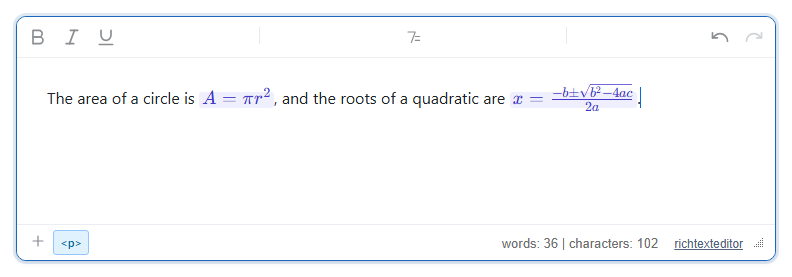
启用
该功能由 mathdialog.js 插件提供(也包含在 plugins/all_plugins.js 中)。工具栏项为 insertmath(工具提示为 "Equation")。默认工具栏把它放在 "More"(⋮)菜单中;在您自己的工具栏中请添加 insertmath。要得到排版后的公式,请在编辑器之前加载 KaTeX:
<link rel="stylesheet" href="/richtexteditor/rte_theme_default.css" />
<link rel="stylesheet" href="https://cdn.jsdelivr.net/npm/katex@0.16.11/dist/katex.min.css" />
<script src="https://cdn.jsdelivr.net/npm/katex@0.16.11/dist/katex.min.js"></script>
<script src="/richtexteditor/rte.js"></script>
<script src="/richtexteditor/plugins/mathdialog.js"></script>

<div id="div_editor1"><p>The area of a circle is </p></div>
<script>
var editor1 = new RichTextEditor("#div_editor1", {
  toolbar: "custom",
  toolbar_custom: "{bold,italic,underline}|{insertmath}|{undo,redo}"
});
// KaTeX's stylesheet is needed inside the editing area too
var link = editor1.getDocument().createElement("link");
link.rel = "stylesheet";
link.href = "https://cdn.jsdelivr.net/npm/katex@0.16.11/dist/katex.min.css";
editor1.getDocument().head.appendChild(link);
</script>
编辑区域是一个独立的文档,因此您页面上的 KaTeX 样式表不会作用到它。没有最后四行代码时,每个公式会在编辑器中显示两次:一次是排版后的公式,一次是 KaTeX 隐藏的无障碍文本。
选项
| 选项 | 默认值 | 作用 |
|---|---|---|
mathDialogSamples | ["x^2 + y^2 = z^2", "\frac{a}{b}", "\sqrt{x}", "\sum_{i=1}^{n} i", "\int_0^1 x\,dx", "\alpha\beta\gamma"] | 输入框下方的示例按钮。空数组则不显示任何按钮。 |
text_insertmath、text_insertmathtitle、text_insertmathlabel、text_insertmathpreview | "Equation"、"Insert / edit equation"、"TeX / LaTeX"、"Preview" | 按钮工具提示、对话框标题和标签。 |
text_ma_norenderer | "No KaTeX/MathJax detected on the page — …" | 找不到渲染器时显示的提示。 |
使用方法
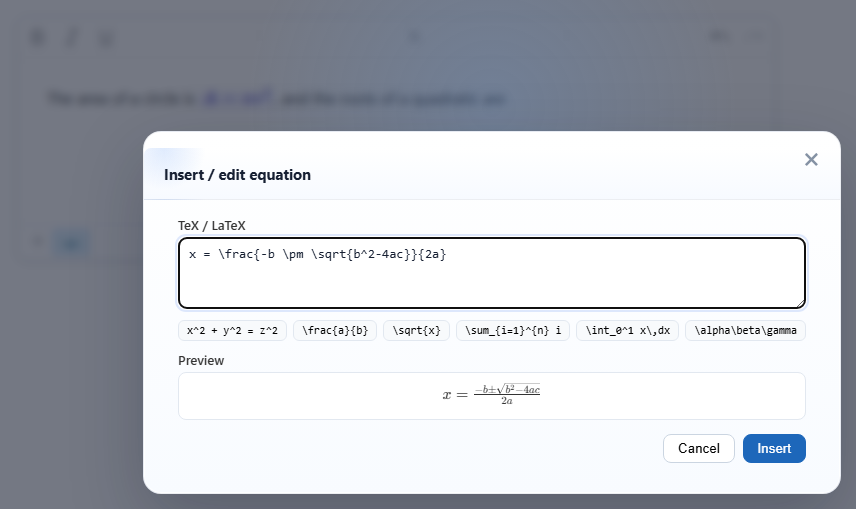
- 点击按钮(或者调用
editor1.execCommand("insertmath"),或在斜杠菜单中选择 "Equation"),输入 TeX,然后点击 Insert。公式会以内联方式插入到光标处。 - 编辑。把光标放在某个公式中,再次打开对话框:它会显示该公式的 TeX,按钮显示为 Update。
- 渲染器。插件先查找
window.katex,然后查找带有typesetPromise的window.MathJax(MathJax 3)。- KaTeX:预览和文档中的公式都会被排版。
- MathJax 3:预览会被排版,但在我们使用 MathJax 3.2.2 的测试中,文档中的公式仍然是
$x^2 + 1$文本。如果希望在编辑时看到排版后的公式,请使用 KaTeX。 - 两者都没有:对话框会提示找不到渲染器,预览显示
$A = \pi r^2$,公式以美元符号之间的文本形式保存。
editor1.renderMath()会排版文档中的每个公式。用setHTMLCode加载的内容在您调用它之前不会被排版。
注意事项
- TeX 源代码始终保存在
data-tex中。没有渲染器时,保存的 HTML 为:
每个公式后面都跟着一个零宽空格,以便把光标放在它之后。<p>The area of a circle is<span class="rte-math-inline" data-tex="A = \pi r^2">$A = \pi r^2$</span> </p> - 使用 KaTeX 时,保存的 HTML 还会在 span 中包含 KaTeX 生成的标记(图中两个公式共 4.6 KB 的 HTML),其中的 MathML 部分会被删除,只留下它的文本。请把
data-tex视为唯一可信的来源,并在显示内容的地方重新排版:<link rel="stylesheet" href="https://cdn.jsdelivr.net/npm/katex@0.16.11/dist/katex.min.css" /> <script src="https://cdn.jsdelivr.net/npm/katex@0.16.11/dist/katex.min.js"></script> <script> document.querySelectorAll(".rte-math-inline[data-tex]").forEach(function (el) { katex.render(el.getAttribute("data-tex"), el, { throwOnError: false }); }); </script> - 把保存的 KaTeX 标记重新加载到编辑器中时,不会出现重复;每个公式仍然只包含一份排版后的副本。
- 直接在文本中输入
$a^2$不会创建公式。只有对话框可以创建。 - 公式都是内联的。没有单独的显示(居中、独占一行)模式。
- 这些示例从 CDN 加载 KaTeX 和 MathJax。如果页面必须离线工作,或者处于严格的内容安全策略之下,请自行托管这些文件。
- 净化程序必须保留带有
class和data-tex属性的span。