可读性统计
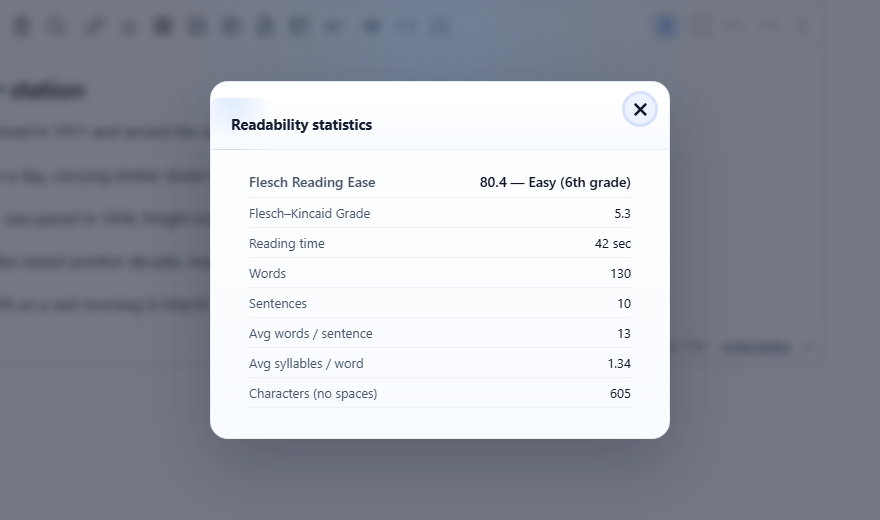
显示文本的阅读难度:Flesch 易读度分数、Flesch–Kincaid 年级水平、估算的阅读时长,以及这些数值背后的单词数、句子数和音节数。所有内容都在浏览器中计算;不需要任何服务或密钥。
启用
该功能由 readabilitystats.js 插件提供(也包含在 plugins/all_plugins.js 中)。加载后即开启。对话框由命令 readability 打开;它没有工具栏按钮,因此请从您自己的按钮调用该命令,或者在加载了斜杠命令插件时,让用户在 "/" 菜单中输入 "/readability"。
<link rel="stylesheet" href="/richtexteditor/rte_theme_default.css">
<script src="/richtexteditor/rte.js"></script>
<script src="/richtexteditor/plugins/readabilitystats.js"></script>

<div id="editor"><p>The station opened in 1911 and served the valley for sixty years.</p></div>
<button type="button" onclick="editor.execCommand('readability')">Readability</button>
<script>
var editor = new RichTextEditor("#editor", {
    readabilityWordsPerMinute: 200
});
</script>
选项
| 选项 | 默认值 | 作用 |
|---|---|---|
readabilityStats | true | false 会关闭该插件:没有命令,也没有方法。 |
readabilityWordsPerMinute | 200 | 估算阅读时长所使用的阅读速度。 |
通过脚本
editor.getReadabilityStats() 测量当前文档;传入一个字符串则改为测量该字符串。对于图中的文章,它返回:
{
  words: 130, sentences: 10, syllables: 174, characters: 605,
  avgWordsPerSentence: 13, avgSyllablesPerWord: 1.34,
  fleschReadingEase: 80.4, fleschKincaidGrade: 5.3,
  readingTimeMinutes: 0.7, readingTimeText: "39 sec",
  easeLabel: "Easy (6th grade)"
}可以用它在编辑器旁边显示分数,或者在发布之前发出警告;文档中的任何内容都不会改变。editor.countSyllables(word) 返回单个单词的音节估算值。
这些数值是如何计算的
- 单词是按空格拆分的文本。句子是以
.、!或?结尾的文本段;没有这些标点的文本算作一个句子。字符数不包括空格。 - 易读度 = 206.835 − 1.015 × (每句单词数) − 84.6 × (每词音节数)。年级 = 0.39 × (每句单词数) + 11.8 × (每词音节数) − 15.59,最低为 0。
- 标签遵循常用的 Flesch 区间:90 及以上为 "Very easy (5th grade)",80 为 "Easy (6th grade)",70 为 "Fairly easy (7th grade)",60 为 "Standard (8–9th grade)",50 为 "Fairly difficult (10–12th grade)",30 为 "Difficult (college)",低于 30 为 "Very difficult (college graduate)"。
注意事项
- 这些公式和音节计数器是为英语设计的。计数器只识别字母 a–z,因此对于其他语言以及带重音符号的单词,分数意义不大。
- 音节是根据元音组估算的,因此有些单词会相差一个(它把 "timetables" 算作 4 个音节)。
- 结尾没有句号的标题或列表项,会被算作下一句的一部分。图中的文章有一个标题和十个句子,结果是 10。
- 对话框会先把时间四舍五入到十分之一分钟,再换算成秒,因此它可能与
readingTimeText不同:对于同一文本,对话框中为 42 sec,而方法返回的是 "39 sec"。 - 对话框的标签来自语言键(
text_readabilitytitle、text_rd_ease、text_rd_grade以及其他text_rd_*键)。方法返回的easeLabel和readingTimeText始终是英文的。
相关内容:字数统计演示、写作辅助演示、execCommand。