@提及
输入 @ 和几个字母,即可从列表中选择一个人。编辑器会把此人插入为一个小的、不可编辑的标签,其中携带此人的 id,以便您的服务器知道提及了谁。列表可以是一个静态数组,也可以是一个向您的服务器发起查询的函数。
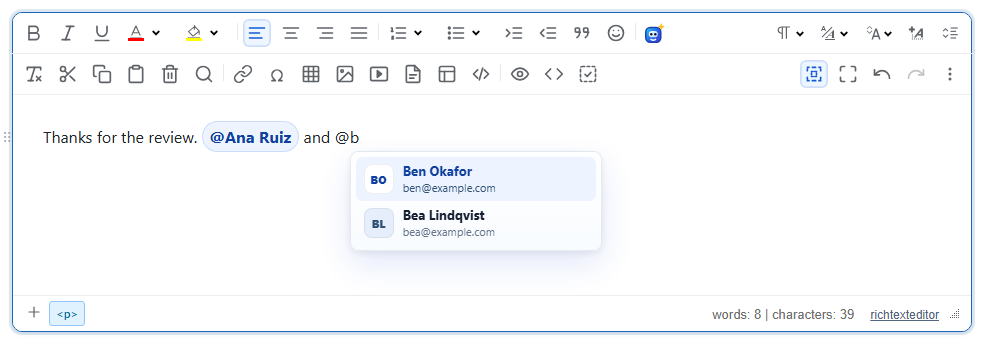
启用
该功能由 mentionplugin.js 插件提供(也包含在 plugins/all_plugins.js 中)。它没有工具栏按钮:用户输入触发字符时打开选择器。只有在您为编辑器提供了列表或数据源时,才会注册 @ 触发字符,因此仅加载插件不会有任何效果。
<link rel="stylesheet" href="/richtexteditor/rte_theme_default.css">
<script src="/richtexteditor/rte.js"></script>
<script src="/richtexteditor/plugins/mentionplugin.js"></script>

<div id="editor"><p>Thanks for the review.</p></div>
<script>
var editor = new RichTextEditor("#editor", {
    mentionStaticList: [
        { id: "u1", label: "Ana Ruiz", subtitle: "ana@example.com" },
        { id: "u2", label: "Ben Okafor", subtitle: "ben@example.com" },
        { id: "u3", label: "Bea Lindqvist", subtitle: "bea@example.com" },
        { id: "u4", label: "Chen Wei", subtitle: "chen@example.com" }
    ]
});
</script>
每一项都需要 id 和 label。subtitle 和 avatarUrl 是可选的;没有头像时,选择器显示此人的姓名首字母。形如 { id, name, email } 的条目也可以使用:name 用作标签,email 用作副标题。
向您的服务器查询
对于真实的用户目录,请改为传入 mentionSource。它接收触发字符之后输入的文本,并返回一个数组或解析为数组的 Promise。运行期间,选择器显示 "Searching…";结果为空时显示 "No matches"。
var people = [{ id: 7, name: "Ana Ruiz", email: "ana@example.com" }, { id: 9, name: "Ben Okafor", email: "ben@example.com" }];
var editor = new RichTextEditor("#editor", {
    mentionSource: function (query, ctx) {
        // ctx.trigger is "@"; replace this with a fetch to your own endpoint
        return new Promise(function (resolve) {
            setTimeout(function () {
                resolve(people.filter(function (p) { return p.name.toLowerCase().indexOf(query.toLowerCase()) >= 0; }));
            }, 100);
        });
    }
});
紧接在触发字符之后的第一次调用,查询为空且立即运行。之后的调用会在最后一次按键后等待 mentionDebounceMs。在更新的查询之后才到达的回答会被丢弃。
选项
| 选项 | 默认值 | 作用 |
|---|---|---|
mentionStaticList | null | 人员数组。按 label、subtitle 和 id 进行不区分大小写的匹配过滤。查询为空时提供前 50 项。 |
mentionSource | null | 返回数组或 Promise 的 function (query, ctx)。两者都设置时,使用它而不是静态列表。 |
mentionTrigger | "@" | 打开选择器的字符。 |
mentionMaxItems | 8 | 一次最多显示的条目数。 |
mentionDebounceMs | 150 | 输入后再次调用数据源之前的等待时间。 |
mentionInsertClass | "rte-mention" | 插入的标签上的类名。 |
mentionTriggers | null | 额外触发字符定义的数组(格式与下面的 register 相同),在启动时注册。 |
mentionEnabled | true | false 会关闭该插件;此时不会创建 editor.mentions。 |
更多触发字符与 API
editor.mentions.register() 添加一个触发字符,例如用于标签的 #。可以像上面那样为它提供 source(query, ctx),或者提供 search(query, done) 并调用 done(list)。
editor.mentions.register({
    trigger: "#",
    search: function (query, done) { done([{ id: "t-12", label: "release-2.6" }, { id: "t-13", label: "billing" }]); },
    insertClass: "tag-chip"
});
定义中还可以包含 renderItem(item)(为列表行返回文本或节点)、renderInsert(item)(返回标签文本或节点)以及 label(列表的可访问名称)。其他方法有 editor.mentions.remove(trigger)、list()、close() 和 isOpen()。
选择器打开时的按键:ArrowUp 和 ArrowDown 移动,Enter 或 Tab 插入,Escape 关闭。输入空格也会关闭它。选择器只在行首或空格之后打开,因此像 mail@example.com 这样的电子邮件地址不会打开它,并且在 <code>、<pre> 或已有的标签内部永远不会打开。
注意事项
- 下面是保存的 HTML。标签后面跟着一个不换行空格,让光标有地方可去:
请在服务器上读取<p>Thanks for the review. <span class="rte-mention" contenteditable="false" data-rte-mention-id="u1" data-rte-mention-trigger="@">@Ana Ruiz</span> and ...</p>data-rte-mention-id来发送通知。如果您对 HTML 进行净化,请允许带有class、contenteditable和两个data-rte-mention-*属性的span。 - 标签的胶囊样式只添加在编辑器内部。显示所保存 HTML 的页面需要为
.rte-mention编写自己的 CSS,而自定义的insertClass则完全没有样式。 - 触发字符是与用户按下的键进行比较的,因此它必须是单个字符。
- 选择器中的文字来自语言键
text_mn_searching和text_mn_nomatches。