Dialog accessibility
Gives the editor's dialogs the names and roles a screen reader needs. Without it, some dialogs are announced as menus and their text fields have no name ("edit, blank"); with it, the Insert Link dialog is a dialog named "Insert Link" and its fields are announced as "URL" and "Text". It is on by default and changes nothing you can see.
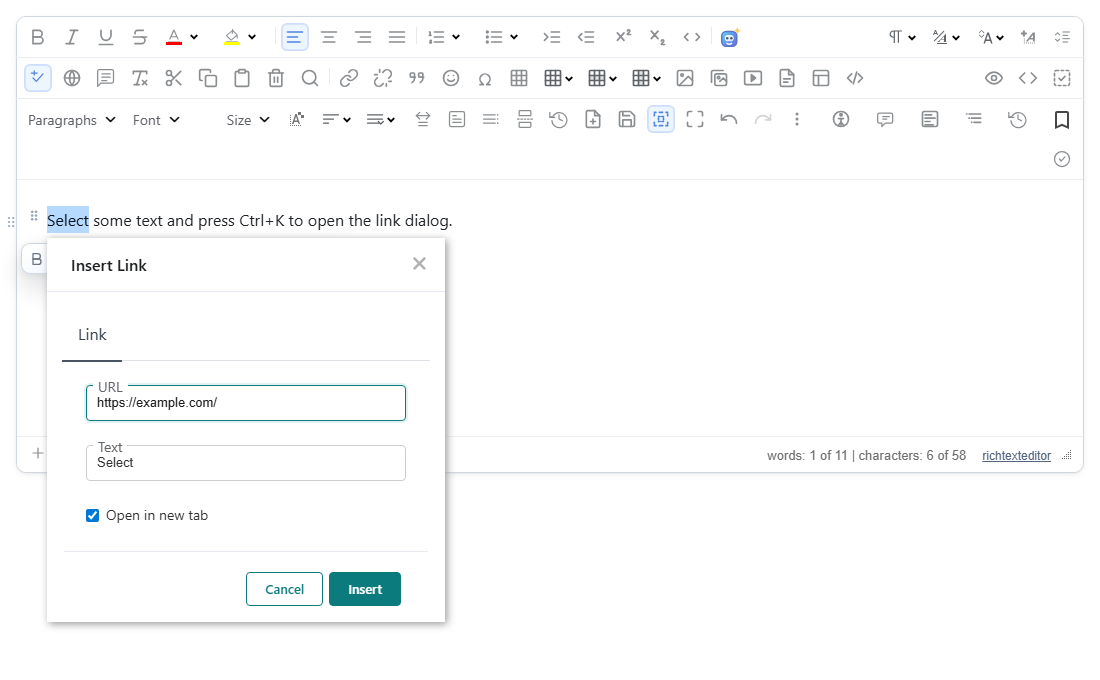
Turn it on
The feature is the dialoga11y.js plugin (also in plugins/all_plugins.js). Loading it is enough: dialogA11y defaults to true. There is no button.
<script src="/richtexteditor/rte.js"></script>
<script src="/richtexteditor/plugins/all_plugins.js"></script>
<div id="editor"><p>Select some text and press Ctrl+K to open the link dialog.</p></div>
<script>
var editor = new RichTextEditor("#editor", { toolbar: "full" });   // dialogA11y: false turns it off
</script>
Options
| Option | Default | What it does |
|---|---|---|
dialogA11y | true | false turns the plugin off. |
editor.applyDialogAccessibility() runs it once over every popup on the page, for example after your code has added fields to an open one.
What it does
The plugin watches the page for the editor's popups (rte-dropdown-panel, rte-dialog-float and .rte-panel-general). For each one that has a title bar (rte-dialog-header):
- Role. A titled popup with text fields gets
role="dialog"instead of therole="menu"the core gives it, because a menu may not contain text fields. A titled popup that only lists commands is left as a menu. A dialog does not keep the menu'saria-orientation. - Name. If the dialog has no name yet, it gets
aria-labelfrom the title text, without a trailing shortcut such as "(Ctrl+K)". - Field labels. Each field with no name gets an
aria-label, taken from the visible label next to it first, so the spoken name matches what is on screen. Fields with no visible label are named from the field's wrapper (rte-dialog-line-ALTbecomes "Alternative text",rte-dialog-line-WIDTH"Width", and so on), then the placeholder, then nearby text, and finally the dialog's name.
Popups without a title bar, such as the colour and font pickers, are left alone. The one exception is an untitled menu that holds a visible text box, which becomes role="dialog".
Dialogs in an rte-dialog-outer frame, such as Insert Image, Insert Emoji and the Image editor (built with editor.createDialog()), are not changed: the core already gives them role="dialog", an aria-label and aria-modal="true".
The accessibility tree of the dialogs we checked, as Playwright reports it, with the plugin off and on:
| Dialog | dialogA11y: false | Default |
|---|---|---|
| Insert Link (toolbar button) | role="menu", fields textbox, textbox | role="dialog", fields textbox "URL", textbox "Text" |
| Insert Link (Ctrl+K) | dialog "Insert Link", fields textbox, textbox | dialog "Insert Link", fields textbox "URL", textbox "Text" |
| Find and Replace | dialog "Find and Replace", fields textbox, textbox | dialog "Find and Replace", fields textbox "Find", textbox "Replace" |
The resulting markup of the toolbar's Insert Link dialog (styles and icons left out):
<rte-dropdown-panel role="dialog" aria-label="Insert Link" class="rte-panel-general rte-panel-insertlink">
  <rte-dialog-header><rte-dialog-header-text>Insert Link</rte-dialog-header-text></rte-dialog-header>
  …
  <rte-dialog-line-url …><rte-dialog-input-label>URL</rte-dialog-input-label><input type="text" aria-label="URL">…</rte-dialog-line-url>
  <rte-dialog-line-text …><rte-dialog-input-label>Text</rte-dialog-input-label><input type="text" aria-label="Text"></rte-dialog-line-text>
  …
</rte-dropdown-panel>
What it does not do
Focus handling is the core editor's, not this plugin's. We checked it on the Insert Link dialog with the plugin off and on, with the same result:
- Focus starts in the URL field (opened by mouse or Ctrl+K).
- Tab and Shift+Tab cycle through URL, Text, Open in new tab, Cancel and Insert and stay inside the dialog.
- Escape closes the dialog and focus returns to the Insert Link toolbar button.
The plugin also does not set aria-modal. The core sets aria-modal="true" on the Insert Image, Insert Emoji and Image editor dialogs and aria-modal="false" on Find and Replace, which lets you keep working in the document; the toolbar's Insert Link panel has no aria-modal.
Things to know
- Nothing is added to the document's HTML; the attributes are on the editor's own dialogs.
- Names are taken from the dialog's visible title and labels, so with a language pack they are in that language. The fallback names ("Alternative text", "Width"…) are English.
- Opening Insert Link by pressing Enter or Space on the toolbar button puts focus on Cancel rather than on the URL field in 2.6.12; Ctrl+K and a mouse click start in the URL field.
Related: Accessibility statement, Accessibility checker, createDialog.