Math equations
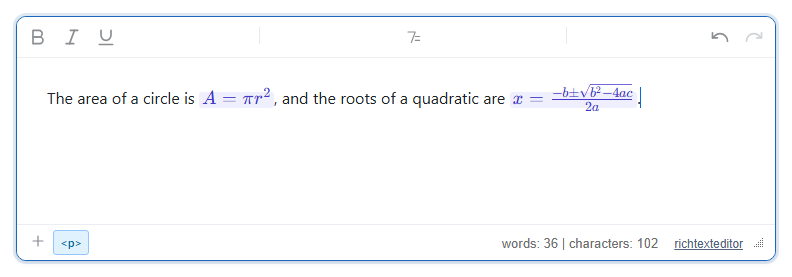
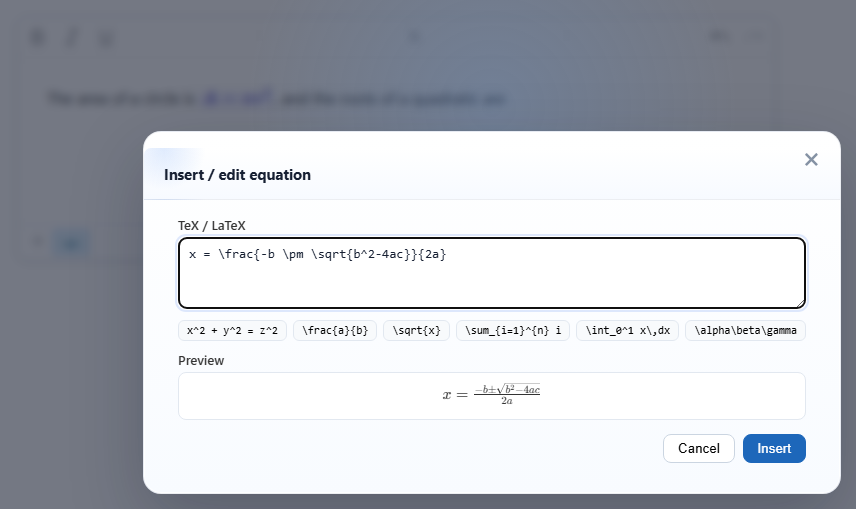
An equation dialog: type TeX or LaTeX, see a live preview, and insert the equation inline in the text. The editor does not include a math renderer; it uses KaTeX or MathJax if your page loads one, and stores the TeX source either way.
Turn it on
The feature is the mathdialog.js plugin (also in plugins/all_plugins.js). The toolbar item is insertmath (tooltip "Equation"). The default toolbar has it in the "More" (⋮) menu; in your own toolbar add insertmath. Load KaTeX before the editor to get typeset equations:
<link rel="stylesheet" href="/richtexteditor/rte_theme_default.css" />
<link rel="stylesheet" href="https://cdn.jsdelivr.net/npm/katex@0.16.11/dist/katex.min.css" />
<script src="https://cdn.jsdelivr.net/npm/katex@0.16.11/dist/katex.min.js"></script>
<script src="/richtexteditor/rte.js"></script>
<script src="/richtexteditor/plugins/mathdialog.js"></script>

<div id="div_editor1"><p>The area of a circle is </p></div>
<script>
var editor1 = new RichTextEditor("#div_editor1", {
  toolbar: "custom",
  toolbar_custom: "{bold,italic,underline}|{insertmath}|{undo,redo}"
});
// KaTeX's stylesheet is needed inside the editing area too
var link = editor1.getDocument().createElement("link");
link.rel = "stylesheet";
link.href = "https://cdn.jsdelivr.net/npm/katex@0.16.11/dist/katex.min.css";
editor1.getDocument().head.appendChild(link);
</script>
The editing area is its own document, so KaTeX's stylesheet on your page does not reach it. Without the last four lines, each equation is shown twice in the editor: once typeset and once as KaTeX's hidden accessibility text.
Options
| Option | Default | What it does |
|---|---|---|
mathDialogSamples | ["x^2 + y^2 = z^2", "\frac{a}{b}", "\sqrt{x}", "\sum_{i=1}^{n} i", "\int_0^1 x\,dx", "\alpha\beta\gamma"] | The sample buttons under the input. An empty array shows none. |
text_insertmath, text_insertmathtitle, text_insertmathlabel, text_insertmathpreview | "Equation", "Insert / edit equation", "TeX / LaTeX", "Preview" | Button tooltip, dialog title and labels. |
text_ma_norenderer | "No KaTeX/MathJax detected on the page — …" | The note shown when no renderer is found. |
Using it
- Click the button (or
editor1.execCommand("insertmath"), or "Equation" in the slash menu), type TeX, then Insert. The equation goes in at the caret, inline with the text. - Editing. Put the caret in an equation and open the dialog again: it shows that equation's TeX and the button reads Update.
- Renderers. The plugin looks for
window.katexfirst, thenwindow.MathJaxwithtypesetPromise(MathJax 3).- KaTeX: the preview and the equations in the document are typeset.
- MathJax 3: the preview is typeset, but in our test with MathJax 3.2.2 the equation in the document stayed as
$x^2 + 1$text. Use KaTeX if you want typeset equations while editing. - Neither: the dialog says no renderer was found, the preview shows
$A = \pi r^2$, and the equation is stored as text between dollar signs.
editor1.renderMath()typesets every equation in the document. Content loaded withsetHTMLCodeis not typeset until you call it.
Things to know
- The TeX source is always kept in
data-tex. Without a renderer, the saved HTML is:
A zero-width space follows each equation so the caret can be placed after it.<p>The area of a circle is<span class="rte-math-inline" data-tex="A = \pi r^2">$A = \pi r^2$</span> </p> - With KaTeX, the saved HTML also holds KaTeX's generated markup inside the span (4.6 KB of HTML for the two equations in the picture), and the MathML part of it is removed, leaving only its text. Treat
data-texas the source of truth and typeset it again where you display the content:<link rel="stylesheet" href="https://cdn.jsdelivr.net/npm/katex@0.16.11/dist/katex.min.css" /> <script src="https://cdn.jsdelivr.net/npm/katex@0.16.11/dist/katex.min.js"></script> <script> document.querySelectorAll(".rte-math-inline[data-tex]").forEach(function (el) { katex.render(el.getAttribute("data-tex"), el, { throwOnError: false }); }); </script> - Saved KaTeX markup loaded back into the editor is not doubled; each equation still holds one typeset copy.
- Typing
$a^2$straight into the text does not create an equation. Only the dialog does. - Equations are inline. There is no separate display (centred, own line) mode.
- KaTeX and MathJax load from a CDN in these examples. Host the files yourself if the page must work offline or under a strict Content Security Policy.
- Sanitizers must keep
spanwith itsclassanddata-texattributes.
Related: MathType (Wiris) demo, getDocument, toolbar items reference.