@mentions
Type @ and a few letters to pick a person from a list. The editor inserts the person as a small, non-editable chip that carries their id, so your server can tell who was mentioned. The list can be a static array or a function that asks your server.
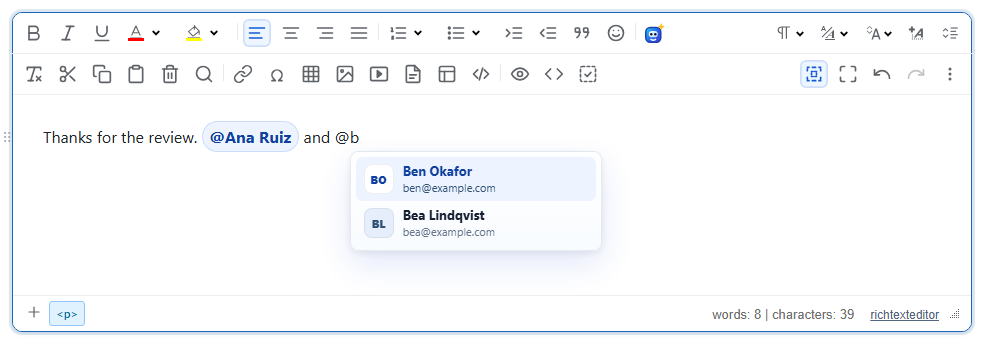
Turn it on
The feature is the mentionplugin.js plugin (also included in plugins/all_plugins.js). There is no toolbar button: the picker opens when the user types the trigger character. The @ trigger is only registered when you give the editor a list or a source, so loading the plugin alone does nothing.
<link rel="stylesheet" href="/richtexteditor/rte_theme_default.css">
<script src="/richtexteditor/rte.js"></script>
<script src="/richtexteditor/plugins/mentionplugin.js"></script>

<div id="editor"><p>Thanks for the review.</p></div>
<script>
var editor = new RichTextEditor("#editor", {
    mentionStaticList: [
        { id: "u1", label: "Ana Ruiz", subtitle: "ana@example.com" },
        { id: "u2", label: "Ben Okafor", subtitle: "ben@example.com" },
        { id: "u3", label: "Bea Lindqvist", subtitle: "bea@example.com" },
        { id: "u4", label: "Chen Wei", subtitle: "chen@example.com" }
    ]
});
</script>
Each item needs an id and a label. subtitle and avatarUrl are optional; without an avatar the picker shows the person's initials. Items shaped { id, name, email } work too: name is used as the label and email as the subtitle.
Asking your server
For a real user directory, pass mentionSource instead. It receives the text typed after the trigger and returns an array, or a Promise of one. While it runs the picker shows "Searching…"; an empty result shows "No matches".
var people = [{ id: 7, name: "Ana Ruiz", email: "ana@example.com" }, { id: 9, name: "Ben Okafor", email: "ben@example.com" }];
var editor = new RichTextEditor("#editor", {
    mentionSource: function (query, ctx) {
        // ctx.trigger is "@"; replace this with a fetch to your own endpoint
        return new Promise(function (resolve) {
            setTimeout(function () {
                resolve(people.filter(function (p) { return p.name.toLowerCase().indexOf(query.toLowerCase()) >= 0; }));
            }, 100);
        });
    }
});
The first call, right after the trigger, has an empty query and runs at once. Later calls wait mentionDebounceMs after the last key. Answers that arrive after a newer query are dropped.
Options
| Option | Default | What it does |
|---|---|---|
mentionStaticList | null | Array of people. Filtered by a case-insensitive match on label, subtitle and id. With an empty query the first 50 are offered. |
mentionSource | null | function (query, ctx) returning an array or a Promise. Used instead of the static list when both are set. |
mentionTrigger | "@" | The character that opens the picker. |
mentionMaxItems | 8 | Most items shown at once. |
mentionDebounceMs | 150 | Wait after typing before calling the source again. |
mentionInsertClass | "rte-mention" | Class put on the inserted chip. |
mentionTriggers | null | Array of extra trigger definitions (same shape as register below), registered at start-up. |
mentionEnabled | true | false turns the plugin off; editor.mentions is then not created. |
More triggers and the API
editor.mentions.register() adds a trigger, for example # for tags. Give it source(query, ctx) like above, or search(query, done) and call done(list).
editor.mentions.register({
    trigger: "#",
    search: function (query, done) { done([{ id: "t-12", label: "release-2.6" }, { id: "t-13", label: "billing" }]); },
    insertClass: "tag-chip"
});
A definition can also have renderItem(item) (return text or a node for the list row), renderInsert(item) (return the chip text or a node) and label (the list's accessible name). The other methods are editor.mentions.remove(trigger), list(), close() and isOpen().
Keys while the picker is open: ArrowUp and ArrowDown move, Enter or Tab inserts, Escape closes. Typing a space closes it too. The picker opens only at the start of a line or after a space, so an email address such as mail@example.com does not open it, and never inside <code>, <pre> or an existing chip.
Things to know
- This is the HTML that is saved. The chip is followed by a non-breaking space so the caret has somewhere to go:
Read<p>Thanks for the review. <span class="rte-mention" contenteditable="false" data-rte-mention-id="u1" data-rte-mention-trigger="@">@Ana Ruiz</span> and ...</p>data-rte-mention-idon the server to send notifications. If you sanitize the HTML, allowspanwithclass,contenteditableand the twodata-rte-mention-*attributes. - The chip's pill style is added inside the editor only. The page that displays the saved HTML needs its own CSS for
.rte-mention, and a custominsertClassgets no style at all. - The trigger is compared with the key the user pressed, so it must be a single character.
- The picker texts come from the language keys
text_mn_searchingandtext_mn_nomatches.
Related: @mentions demo, configuration reference.