Readability statistics
Shows how hard a text is to read: the Flesch Reading Ease score, the Flesch–Kincaid grade level, an estimated reading time, and the word, sentence and syllable counts behind them. Everything is computed in the browser; no service or key is needed.
Turn it on
The feature is the readabilitystats.js plugin (also in plugins/all_plugins.js). It is on once loaded. The dialog is opened by the command readability; there is no toolbar button, so call the command from your own button, or let users type "/readability" in the "/" menu when the slash-command plugin is loaded.
<link rel="stylesheet" href="/richtexteditor/rte_theme_default.css">
<script src="/richtexteditor/rte.js"></script>
<script src="/richtexteditor/plugins/readabilitystats.js"></script>

<div id="editor"><p>The station opened in 1911 and served the valley for sixty years.</p></div>
<button type="button" onclick="editor.execCommand('readability')">Readability</button>
<script>
var editor = new RichTextEditor("#editor", {
    readabilityWordsPerMinute: 200
});
</script>
Options
| Option | Default | What it does |
|---|---|---|
readabilityStats | true | false turns the plugin off: no command and no methods. |
readabilityWordsPerMinute | 200 | Reading speed used for the reading-time estimate. |
From script
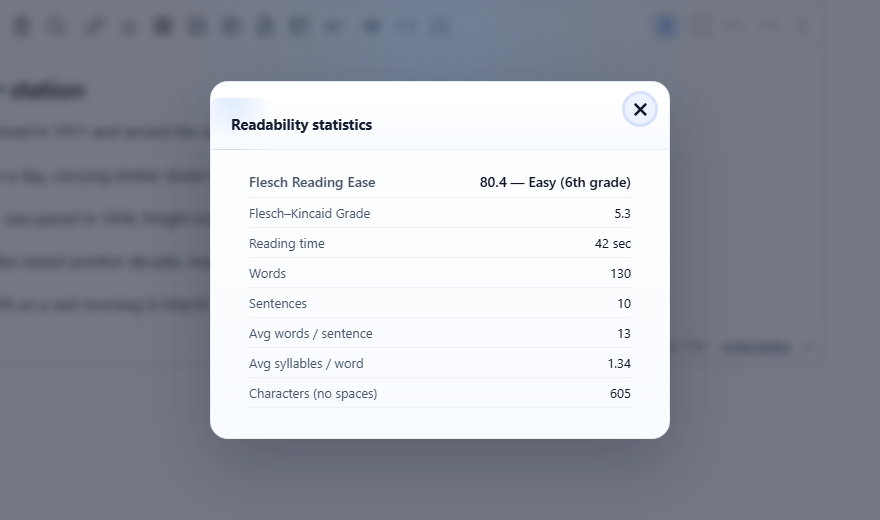
editor.getReadabilityStats() measures the current document; pass a string to measure that instead. For the article in the picture it returned:
{
  words: 130, sentences: 10, syllables: 174, characters: 605,
  avgWordsPerSentence: 13, avgSyllablesPerWord: 1.34,
  fleschReadingEase: 80.4, fleschKincaidGrade: 5.3,
  readingTimeMinutes: 0.7, readingTimeText: "39 sec",
  easeLabel: "Easy (6th grade)"
}
Use it to show a score next to the editor or to warn before publishing; nothing in the document is changed. editor.countSyllables(word) returns the syllable estimate for one word.
How the numbers are made
- Words are the text split on spaces. Sentences are runs ending in
.,!or?; text with no such mark counts as one sentence. Characters exclude spaces. - Reading Ease = 206.835 − 1.015 × (words per sentence) − 84.6 × (syllables per word). Grade = 0.39 × (words per sentence) + 11.8 × (syllables per word) − 15.59, never below 0.
- The label follows the usual Flesch bands: 90 and up "Very easy (5th grade)", 80 "Easy (6th grade)", 70 "Fairly easy (7th grade)", 60 "Standard (8–9th grade)", 50 "Fairly difficult (10–12th grade)", 30 "Difficult (college)", below 30 "Very difficult (college graduate)".
Things to know
- The formulas and the syllable counter are for English. The counter only looks at the letters a–z, so for other languages, and for words with accents, the scores mean little.
- Syllables are estimated from vowel groups, so some words are off by one (it counts "timetables" as 4).
- A heading or list item without a final full stop is counted as part of the next sentence. The picture's article has a heading and ten sentences, and the result is 10.
- The dialog rounds the time to a tenth of a minute before converting to seconds, so it can differ from
readingTimeText: 42 sec in the dialog and "39 sec" from the method for the same text. - The dialog's labels come from language keys (
text_readabilitytitle,text_rd_ease,text_rd_gradeand the othertext_rd_*keys). TheeaseLabelandreadingTimeTextreturned by the method are always English.
Related: word count demo, writing assistance demo, execCommand.