Email HTML
Turns the document into HTML that survives an email client. Mail clients drop <style> blocks, external stylesheets and class names, so editor.getEmailHTML() copies the look of each element onto it as an inline style attribute, removes class and id, and wraps the result in a centred table of fixed width.
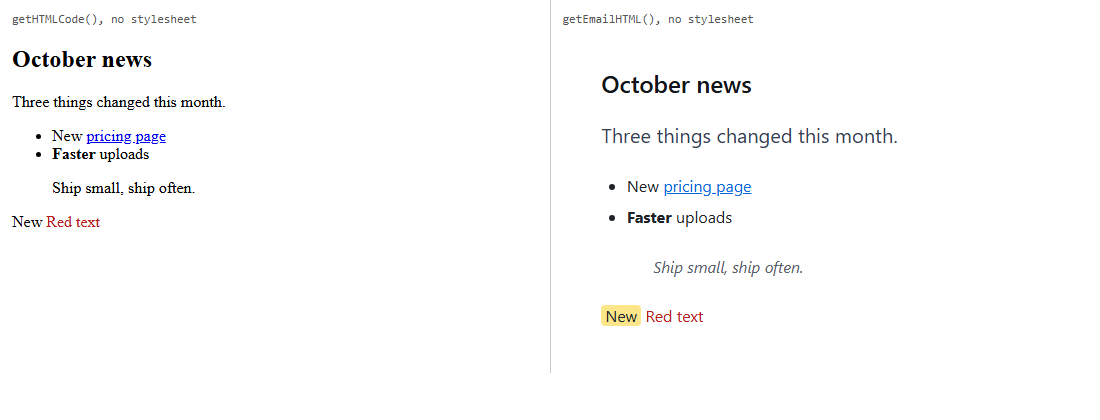
getHTMLCode() on the left, getEmailHTML() on the right. The pull quote's left border is lost; see Things to know.Turn it on
The feature is the emailtoolkit.js plugin (also in plugins/all_plugins.js). It adds the method editor.getEmailHTML() and the command emailexport ("Email HTML"). The button is in the "more" panel of the default toolbar, and the slash menu lists it as "Export email HTML". To put it on your own toolbar:
<div id="editor"><h2>October news</h2><p class="lede">Three things changed this month.</p>…</div>
<script>
var editor = new RichTextEditor("#editor", {
  contentCssUrl: "site.css",
  toolbar_default: "{bold,italic,underline}|{paragraphs}|{emailexport}"
});
// Send this to your mail service:
var html = editor.getEmailHTML({ width: 600 });
</script>
Options
| Option | Default | What it does |
|---|---|---|
emailInlineProperties | color, background-color, font-family, font-size, font-weight, font-style, text-decoration, text-align, line-height, the four margin-* and padding-*, border, border-radius, vertical-align, list-style-type, width | The CSS properties copied onto each element. Only these are copied. |
emailWrapWidth | 640 | Width in pixels of the wrapping table. |
getEmailHTML(options) takes { wrap: false } to return the inlined content without the table, and { width: 600 } to override emailWrapWidth for one call.
What you get
Each element gets the computed value of each listed property, minus values that are the default (normal, none, 0px, a transparent background, weight 400, left or start alignment, baseline). width is written only on tables, cells and images, and list-style-type only on lists. From the run above, getEmailHTML({ wrap: false }) starts:
<h2 style="color:rgb(17, 20, 24);font-family:system-ui, -apple-system, "Segoe UI", Roboto, "Helvetica Neue", Arial, sans-serif;font-size:24px;font-weight:600;line-height:30px;margin-bottom:14.4px">October news</h2><p style="color:rgb(51, 65, 85);font-family:system-ui, …;font-size:20px;line-height:34px;margin-bottom:20px">Three things changed this month.</p>The class="lede" and the heading's id are gone; the lead paragraph's 20px grey text came from the class. Links keep href, images keep src and alt. script, style, link and meta elements are dropped. With the wrapper (the default) the content sits inside:
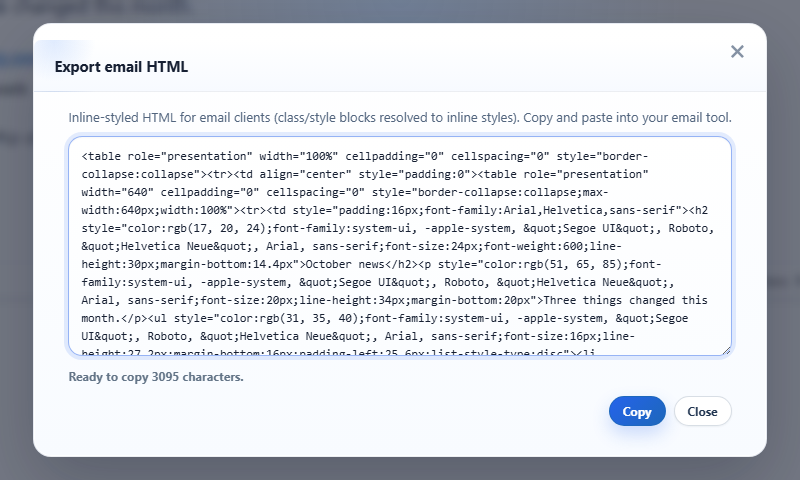
<table role="presentation" width="100%" cellpadding="0" cellspacing="0" style="border-collapse:collapse"><tr><td align="center" style="padding:0"><table role="presentation" width="600" cellpadding="0" cellspacing="0" style="border-collapse:collapse;max-width:600px;width:100%"><tr><td style="padding:16px;font-family:Arial,Helvetica,sans-serif">…</td></tr></table></td></tr></table>The dialog shows the full wrapped HTML in a read-only text box with focus in it, the length ("Ready to copy 3095 characters."), Copy, which writes it to the clipboard, and Close.
Things to know
- Properties outside the list are lost. The pull quote above had
border-left: 4px solidfrom its class;borderhas no single value when the sides differ, so the rule did not come through. Add the property you need: withemailInlineProperties: ["color", "border-left", "padding-left", "font-style"]the quote came out as<blockquote style="color:rgb(87, 96, 106);border-left:4px solid rgb(37, 99, 235);padding-left:12px;font-style:italic">. Properties you add are not filtered for defaults, so they also appear asborder-left:0px noneon other elements. - Styles are read from the editor as it is displayed. The content stylesheet (
contentCssUrl) is what gives classes their look, so load the same CSS your emails should have. Fonts become the full computed font stack. - It is built from the live document, so tags can differ from
getHTMLCode(): bold typed as<strong>stays<strong>here, whilegetHTMLCode()returned<b>. - With merge-field preview on, the email uses the template's fields, not the sample data.
- The output is not stored anywhere; the document itself is unchanged. Image URLs are kept as written, so use absolute URLs in emails.
Related: email campaign demo, getting the HTML.