Add an image gallery to a rich text editor in Next.js
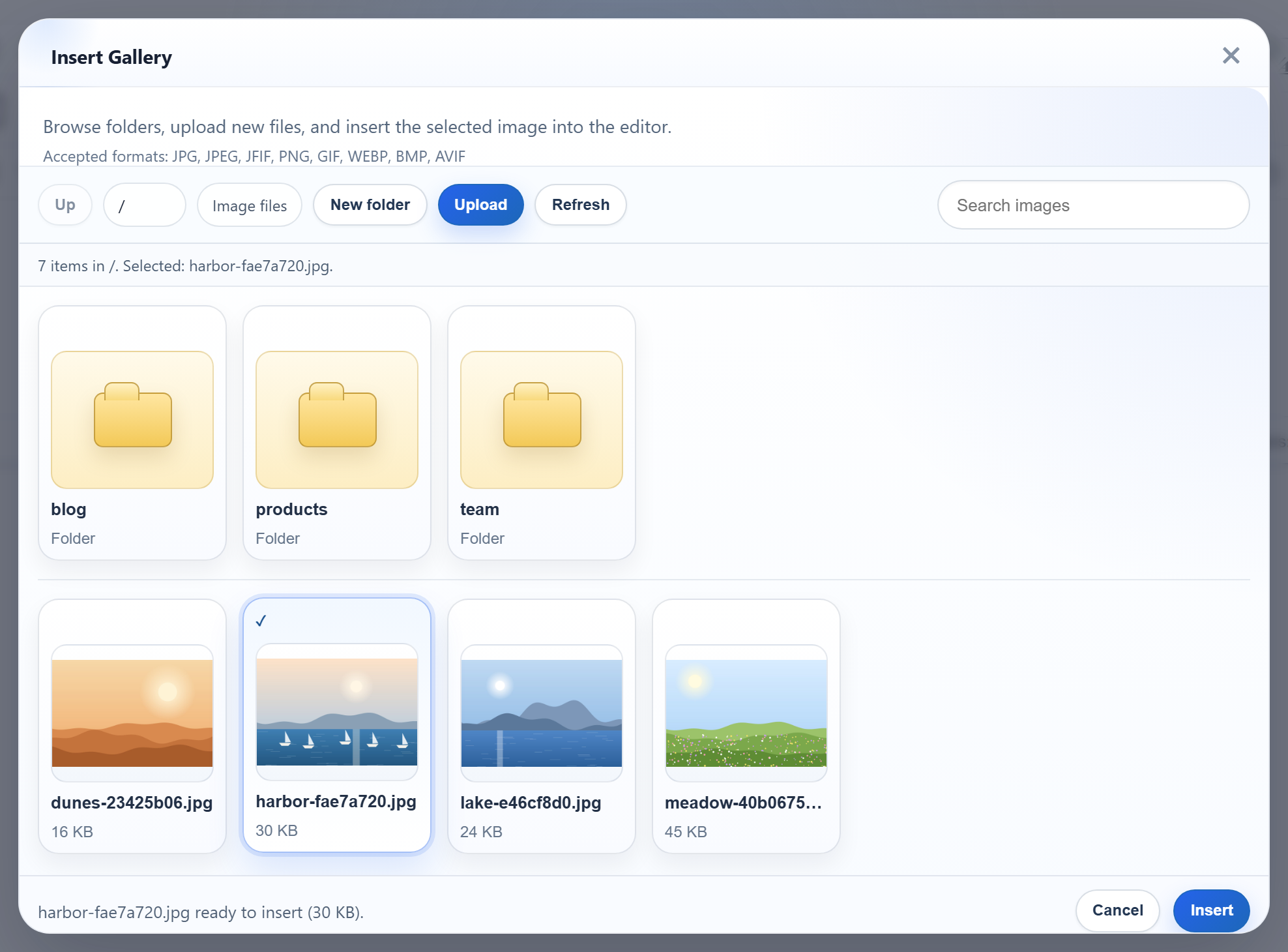
RichTextEditor is a browser script, not a React component, so in a Next.js App Router project it needs a little care: it must load only in the browser, in the right order, and be destroyed when React unmounts it, which in development happens straight after the first mount. This page shows a client component that does that, and the route handler that answers the Insert Gallery dialog.
Options from the server, the editor in the browser
The page is a server component. It holds the script list and the editor options, and passes them as props to a client component:
// The editor and rte-files.js are plain browser scripts, served from public/
// (copied there by scripts/copy-editor.mjs).
const scripts = [
  "/richtexteditor/rte.js",
  "/richtexteditor/plugins/all_plugins.js",
  "/rte-files.js",
];

const config = {
  toolbar: "full",
  galleryEndpoint: "/rte/gallery",
  maxUploadFileSize: 4000000,
};
With galleryEndpoint set, the Insert Gallery dialog requests GET /rte/gallery?folder= when it opens. /rte-files.js provides the upload function the dialog's Upload button calls. The editor files themselves are plain files in public/richtexteditor/. The sample's npm run dev and npm run build copy them there first.
The client component
// Loads the scripts one after another, once per page, however often the component mounts.
let loading: Promise<void> | undefined;
function loadScripts(sources: string[]): Promise<void> {
  loading ??= sources.reduce(
    (previous, src) =>
      previous.then(
        () =>
          new Promise<void>((resolve, reject) => {
            const script = document.createElement("script");
            script.src = src;
            script.onload = () => resolve();
            script.onerror = () => reject(new Error("Could not load " + src));
            document.head.appendChild(script);
          }),
      ),
    Promise.resolve(),
  );
  return loading;
}

export default function Editor({ scripts, config, initialHtml = "" }: EditorProps) {
  const container = useRef<HTMLDivElement>(null);

  useEffect(() => {
    let editor: RichTextEditorInstance | undefined;
    let unmounted = false;
    loadScripts(scripts).then(() => {
      if (unmounted || !container.current) return;
      editor = new window.RichTextEditor(container.current, config);
      editor.setHTMLCode(initialHtml);
    });
    // React's development mode mounts twice; destroy the first editor before the second.
    return () => {
      unmounted = true;
      editor?.destroy();
    };
  }, [scripts, config, initialHtml]);

  return <div ref={container} />;
}
Three choices in it:
- The scripts load one after another, once per page.
rte.jsmust run beforeall_plugins.js, and both beforerte-files.js. The promise is kept in a module variable, so a second mount waits for the same load instead of adding the scripts again. - Not
next/scriptwithbeforeInteractive. The Next.js documentation says those scripts are fetched early, but their execution "does not block page hydration". The effect could then run beforewindow.RichTextEditorexists. Waiting for the scripts'onloadavoids that race. - The cleanup destroys the editor. In
next dev, React Strict Mode mounts the component, unmounts it and mounts it again. The cleanup destroys the first instance before the second is created. Our browser check found exactly one editor on the page in bothnext devandnext start. Here the scripts usually finish loading only after the first unmount, so the first mount often never creates an editor at all. Theunmountedflag covers that case.
The gallery route handler
// GET  /rte/gallery?folder=products                      -> listing
// POST /rte/gallery  action=create-folder, folder, name  -> listing of the parent folder
import { GalleryError, checkOrigin, createFolder, errorResponse, listFolder, readForm } from "@/lib/gallery";
import { rootFor } from "@/lib/root-for";

export const runtime = "nodejs"; // the default, written out: this route uses node:fs

export async function GET(request: Request) {
  try {
    const params = new URL(request.url).searchParams;
    if (params.getAll("folder").length > 1) throw new GalleryError(400, "Invalid folder.");
    return Response.json(await listFolder(await rootFor(request), params.get("folder") ?? ""));
  } catch (error) {
    return errorResponse(error);
  }
}

export async function POST(request: Request) {
  try {
    checkOrigin(request);
    const form = await readForm(request);
    if (form.get("action") !== "create-folder") throw new GalleryError(400, "Unknown action.");
    return Response.json(await createFolder(await rootFor(request), form.get("folder") ?? "", form.get("name")));
  } catch (error) {
    return errorResponse(error);
  }
}
GET reads ?folder= with URLSearchParams. A repeated folder parameter is refused with a 400, so the listing only ever gets one value. Route handlers are not cached by default in Next.js 16, and next build lists this one as dynamic (ƒ). The listing is read from disk on every request, so a new upload shows the next time the dialog opens.
The listing itself is plain Node.js in lib/gallery.ts:
// The JSON the gallery dialog reads (see CONTRACT.md).
export async function listFolder(root: string, folder = "") {
  if (isUsersFolder(root, folder)) throw new GalleryError(404, "Folder not found.");
  const dir = await resolveFolder(root, folder);
  const entries = await readdir(dir, { withFileTypes: true });
  const join = (name: string) => (folder ? folder + "/" + name : name);

  const folders = entries
    .filter((entry) => entry.isDirectory() && isValidName(entry.name) && !isUsersFolder(root, join(entry.name)))
    .map((entry) => ({ folder: join(entry.name), name: entry.name }));

  const images = [];
  for (const entry of entries) {
    if (!entry.isFile() || !isImageName(entry.name)) continue;
    const file = path.join(dir, entry.name);
    const { size } = await lstat(file);
    images.push({ url: publicUrl(file), name: entry.name, folder, size });
  }

  return {
    currentFolder: folder,
    currentFolderDisplay: "/" + folder,
    parentFolder: folder === "" ? null : folder.split("/").slice(0, -1).join("/"),
    folders: folders.sort(byName),
    images: images.sort(byName),
  };
}

// Plain lower-case comparison, so every server sample sorts the same way.
function byName(a: { name: string }, b: { name: string }) {
  const x = a.name.toLowerCase();
  const y = b.name.toLowerCase();
  return x < y ? -1 : x > y ? 1 : 0;
}
It lists image files and valid folder names only, sorts them with a plain lower-case comparison, and builds URLs under /uploads/. Those URLs are served by app/uploads/[...path]/route.ts, not by public/. next start does not serve files that were added to public/ after the build (we got a 404), so new uploads would not appear. Upload images in Next.js covers that route.
What the dialog shows
The picture at the top is the dialog on this sample: three folders and four images at the root. The released gallery's hint lists JFIF, BMP and AVIF among the accepted formats, but this server takes only .jpg, .jpeg, .png, .gif and .webp. A refused file shows the dialog's own message, "Upload failed for <name>.", not the server's text.
Test it
Download the sample project for this guide. Copy the editor's richtexteditor folder to public/richtexteditor, or set RTE_DIR to it. Then:
npm install
npm run build
npm start

curl -F "file=@photo.jpg" -F "folder=blog" http://localhost:5102/rte/upload
{"url":"/uploads/blog/photo-2cb4607d.jpg"}

curl "http://localhost:5102/rte/gallery?folder=../"
{"error":"Invalid folder."}
Open http://localhost:5102 and click Insert Gallery. Open blog, select the picture and click Insert. The image is in the text with src="/uploads/blog/...".
The same guide for other platforms
JavaScript · PHP · ASP.NET Core · Razor Pages · Blazor · MVC 5 · Web Forms