Auto-embed
Paste a YouTube, Vimeo or other video link on an empty line and it becomes a 16:9 video player in the document. The plugin recognises links by their address pattern; it calls no oEmbed or other web service.
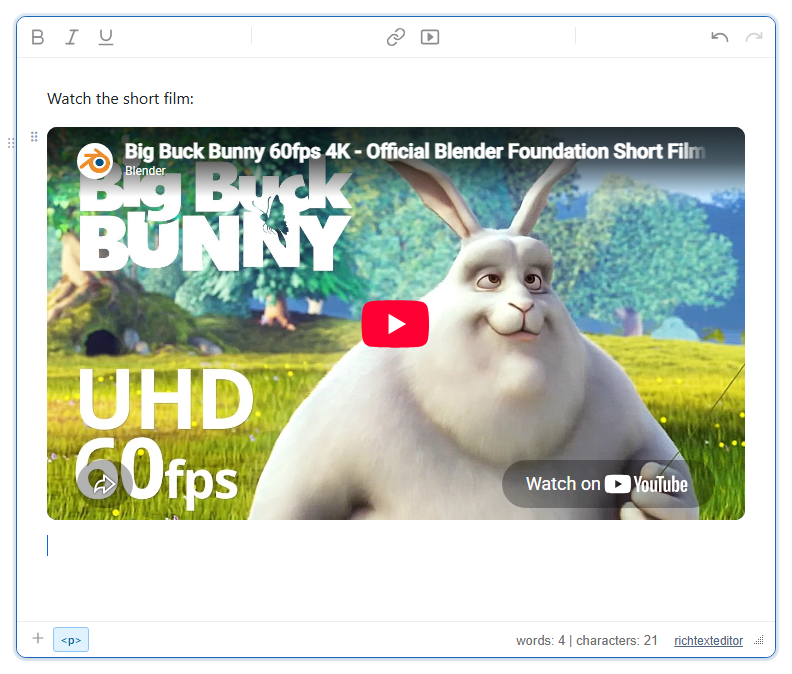
https://www.youtube.com/watch?v=aqz-KE-bpKQ into an empty paragraph.Turn it on
The feature is the autoembed.js plugin (also in plugins/all_plugins.js). There is no button: loading the plugin turns it on.
<link rel="stylesheet" href="/richtexteditor/rte_theme_default.css" />
<script src="/richtexteditor/rte.js"></script>
<script src="/richtexteditor/plugins/autoembed.js"></script>

<div id="div_editor1"><p>Watch the short film:</p><p><br></p></div>
<script>
var editor1 = new RichTextEditor("#div_editor1", {
  toolbar: "custom",
  toolbar_custom: "{bold,italic,underline}|{insertlink,insertvideo}|{undo,redo}"
});
</script>
Pages that load all_plugins.js have it on already; set autoEmbedEnabled: false to keep pasted video links as links.
Supported links
| Provider | Pasted link | Player address |
|---|---|---|
| YouTube | youtube.com/watch?v=ID, youtu.be/ID, youtube.com/shorts/ID | https://www.youtube.com/embed/ID |
| Vimeo | vimeo.com/123456789, player.vimeo.com/video/123456789 | https://player.vimeo.com/video/ID |
| Dailymotion | dailymotion.com/video/ID, dai.ly/ID | https://www.dailymotion.com/embed/video/ID |
| Loom | loom.com/share/ID (32 hex characters) | https://www.loom.com/embed/ID |
| CodePen | codepen.io/USER/pen/ID | https://codepen.io/USER/embed/ID?default-tab=result |
| TED | ted.com/talks/NAME | https://embed.ted.com/talks/NAME |
| Youku | v.youku.com/v_show/id_ID.html | https://player.youku.com/embed/ID |
| Coub | coub.com/view/ID | https://coub.com/embed/ID |
The ID is checked against a strict pattern for each provider, and the player address is built from a fixed template, so the pasted text never becomes the iframe address as it is. Links from other sites, including tweets, stay ordinary links.
Options
| Option | Default | What it does |
|---|---|---|
autoEmbedEnabled | true | Turns embedding on paste on or off. editor.embedUrl() works either way. |
autoEmbedResolver | null | function (url) for your own providers. Return the player address as a string starting with https://, or anything else to leave the link alone. It is asked only for links the built-in list does not know. |
var editor1 = new RichTextEditor("#div_editor1", {
  autoEmbedResolver: function (url) {
    var m = /^https:\/\/media\.example\.com\/v\/([a-z0-9]+)$/i.exec(url);
    return m ? "https://media.example.com/embed/" + m[1] : null;
  }
});
With this resolver, pasting https://media.example.com/v/abc123 made a player for https://media.example.com/embed/abc123. Pasting the same link with http:// made a link: the resolver did not match it.
Using it
- Paste the link into an empty line, or onto a line that will hold nothing else. The paragraph is replaced by the player and an empty paragraph after it, with the caret there.
- A link pasted in the middle of a sentence stays a link:
See this: https://youtu.be/…becameSee this: <a href="https://youtu.be/…">…</a>. - Only plain-text pastes of one address count. Text with spaces in it, or a paste over a selection, is left to the editor's normal paste.
- From script:
editor1.embedUrl(url)inserts the player at the caret and returnstrue, or returnsfalsefor an address it does not know.editor1.embedUrl("https://vimeo.com/76979871")returnedtrue. - For a dialog with size options, use the editor's Insert Video button (
insertvideo).
Things to know
- The saved markup is a wrapper with the player inside:
The sizing is in inline styles, so the player keeps its 16:9 shape on your page without extra CSS. The editor added the<div class="rte-embed" contenteditable="false" data-embed="https://www.youtube.com/embed/aqz-KE-bpKQ" style="display:block; margin:12px 0; max-width:720px"><div class="rte-embed-frame" style="position:relative; width:100%; height:0; padding-bottom:56.25%; overflow:hidden; border-radius:10px; background:#000"><iframe src="https://www.youtube.com/embed/aqz-KE-bpKQ" loading="lazy" allowfullscreen="" referrerpolicy="strict-origin-when-cross-origin" allow="accelerometer; autoplay; clipboard-write; encrypted-media; gyroscope; picture-in-picture" style="position:absolute; top:0; left:0; width:100%; height:100%; border:0" sandbox="allow-scripts allow-same-origin allow-presentation"></iframe></div></div>sandboxattribute. - Making the player needs no network: offline, the paste still produced the same markup. The video itself loads from the provider when someone views it, which also means the provider sees the viewer's visit.
- Your sanitizer must allow
iframewith these attributes, and should allow only the player hosts above. A Content Security Policy needs those hosts inframe-src.
Related: media embed demo, embed video demo, bookmark cards.