Multiple editable regions
Makes several editors on one page behave as one: only the region the author is working in shows a toolbar, and one group API reads and writes all regions at once. Use it for a CMS form with a title, a summary and a body that should not each carry a full toolbar.
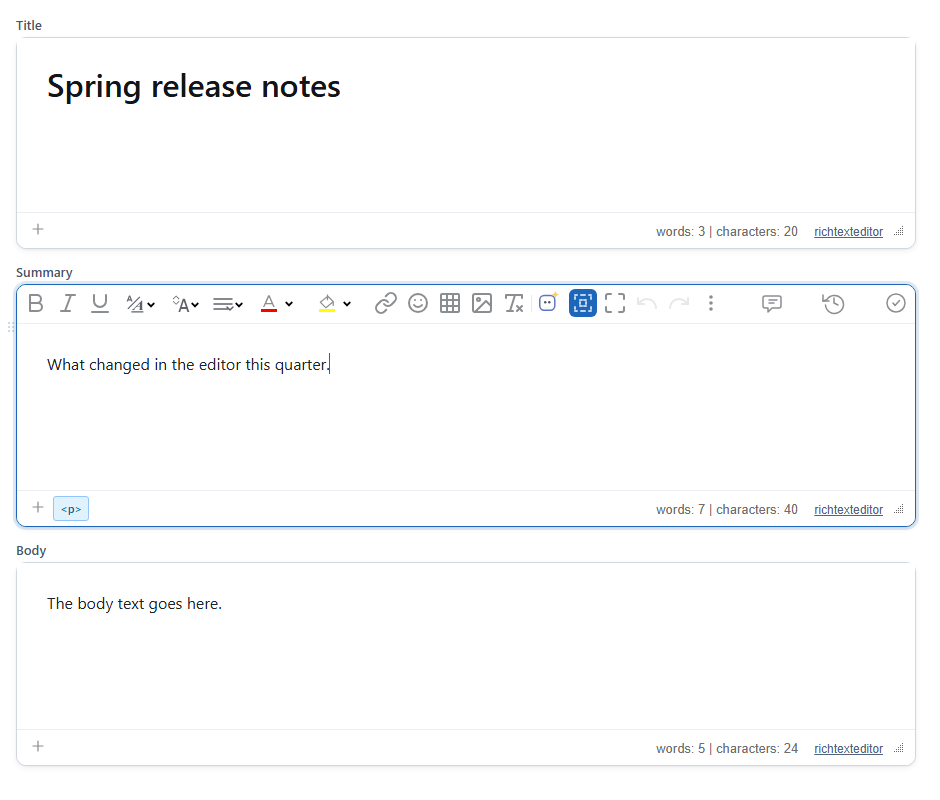
"article". The toolbar shows only on the region with focus, here Summary.Turn it on
The feature is the multiroot.js plugin (also in plugins/all_plugins.js). Create one editor per region and give them the same multiRootGroup. There is no button.
<label>Title</label><div id="title"><h1>Spring release notes</h1></div>
<label>Summary</label><div id="summary"><p>What changed in the editor this quarter.</p></div>
<label>Body</label><div id="body"><p>The body text goes here.</p></div>
<script>
function root(id, height) {
  return new RichTextEditor("#" + id, { multiRootGroup: "article", height: height, toolbar: "basic" });
}
var title = root("title", "110px");
var summary = root("summary", "110px");
var body = root("body", "200px");
</script>
Each region is named after its element's id, so this group has the roots title, summary and body. The first root starts as the active one.
Options
| Option | Default | What it does |
|---|---|---|
multiRootGroup | null (off) | Editors with the same group name form one multi-root editor. |
multiRootName | the element's id, else root1, root2… | The root's name in the group API. |
multiRootToolbarHost | null | An element or element id to move the active toolbar into. Do not use it in 2.6.12; see Things to know. |
Group API
Every editor in the group gets the same editor.multiRoot object:
| Member | What it does |
|---|---|
getRoots() | ["title", "summary", "body"] |
getActive() | The name of the root with the toolbar, e.g. "summary". |
getEditor(name) | That root's editor instance. |
focusRoot(name) | Makes that root active and focuses it. |
getHTML() | One entry per root, which is what a CMS saves: {"title":"<h1 id=\"spring-release-notes\">Spring release notes</h1>","summary":"<p>What changed in the editor this quarter.</p>","body":"<p>The body text goes here.</p>"} |
setHTML(map) | Loads each root named in the map; roots not in the map are left alone. |
onActiveChange(fn) | Calls fn({ active, editor }) when another root becomes active. Returns a function that removes the listener. |
getCapabilities() | { sharedToolbar: true, sharedGroupApi: true, perRootUndo: true, sharedUndoStack: false, selectionAcrossRoots: false, sharedCollaborationSession: false, note } |
title.multiRoot.onActiveChange(function (e) {
  document.getElementById("where").textContent = "Editing: " + e.active;
});
fetch("/api/article/42", { method: "PUT", body: JSON.stringify(title.multiRoot.getHTML()) });
Using it
Clicking into a region, or anything else that puts focus in it (including focusRoot()), makes it active: its toolbar appears and the others are hidden. The toolbar buttons act on that region. In the test, selecting the end of the body and clicking Bold saved <p>The body text goes h<b>ere.</b></p> in body and left the other roots unchanged.
Things to know
- The regions are separate editors. Undo works per region, a selection cannot span two regions, and with collaboration each region syncs on its own.
getCapabilities()states the same. - Hidden toolbars take no space, so the content below moves by one toolbar's height when the active region changes.
- A window resize shows all toolbars again in 2.6.12, until the author moves to another region. The editor's own responsive code restores them.
multiRootToolbarHostdoes not work in 2.6.12. A toolbar moved into the host loses the editor's styling (it renders with very large icons), and toolbars already moved there are not hidden again, so they pile up as the author switches regions. Leave the toolbars in place.- Each region is a normal editor with its own config, so different regions can have different toolbars; set the same
multiRootGroupon all of them.
Related: multiple editors on one page demo, getting the HTML.