Fold headings
Collapse the section under a heading to get a long document out of the way, and expand it again with one click. Folding only changes what is shown while editing; the saved HTML always contains every section.
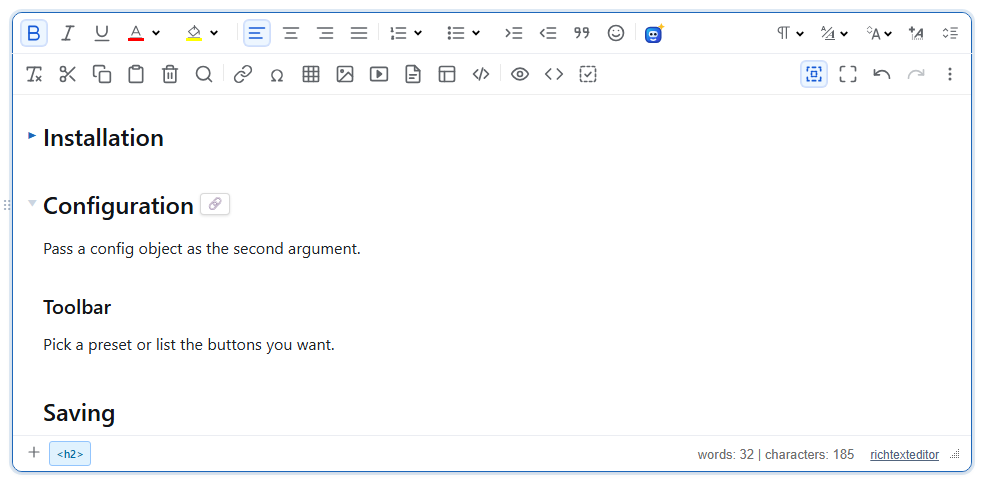
Turn it on
The feature is the foldheadings.js plugin (also in plugins/all_plugins.js). Loading it is enough; it is on by default and has no toolbar button.
<link rel="stylesheet" href="/richtexteditor/rte_theme_default.css">
<script src="/richtexteditor/rte.js"></script>
<script src="/richtexteditor/plugins/foldheadings.js"></script>

<div id="editor">
<h2>Installation</h2>
<p>Copy the richtexteditor folder to your site and add two script tags.</p>
<p>Then create the editor on a div or a textarea.</p>
<h3>Requirements</h3>
<p>Any modern browser.</p>
<h2>Configuration</h2>
<p>Pass a config object as the second argument.</p>
</div>
<script>
var editor = new RichTextEditor("#editor");
</script>
Using it
Hover a heading (h1 to h6) and a small arrow appears in the margin to its left. Click the arrow to fold. A folded heading keeps a blue arrow that points right; click it to unfold. Clicking the heading's text places the caret as usual and does not fold. On touch screens the arrows stay faintly visible, since there is no hover.
A fold hides every block after the heading up to the next heading of the same or a higher level. Folding an h2 therefore also hides the h3 sections inside it; folding an h3 stops at the next h3 or h2. If the caret is inside a block that is about to be hidden, it is moved to the end of the heading so it never sits in hidden text.
Options and API
| Option | Default | What it does |
|---|---|---|
foldHeadingsEnabled | true | false turns off folding by clicking. The methods below still work. |
editor.foldAtCaret()folds or unfolds the section the caret is in (its own heading, or the nearest heading above it). Returnsfalseif there is no heading.editor.toggleHeadingFold(headingElement)folds or unfolds one heading.editor.unfoldAll()opens every section.
With the slash-command plugin loaded, the "/" menu has "Fold section" and "Unfold all" entries that call these methods, which gives keyboard users a way to fold.
Things to know
- The fold state is two CSS classes while editing,
rte-fold-collapsedon the heading andrte-fold-hiddenon the hidden blocks.getHTMLCode(),getHTMLContent()andgetJSON()take them off for the call, so hidden sections are saved. The state itself is not saved: a document always opens unfolded. - Elements that have been folded keep an empty
classattribute in the saved HTML:
It is harmless, but it shows up in diffs. (The<h2 id="installation" class="">Installation</h2> <p class="">Copy the richtexteditor folder to your site and add two script tags.</p>idcomes from the editor's heading anchors,autoHeadingAnchors, not from this plugin.) - Folding fires the editor's
changeevent, although the content did not change. Keep that in mind if you use the event to mark a document as unsaved. - Only headings that are siblings are folded together. A heading inside a wrapper such as a
divfolds only the blocks that follow it inside that wrapper. - With
plugins/all_plugins.js, the block drag handle (⠿) sits in the same left margin and covers the arrow, so clicks reach the handle instead. SetdragHandleEnabled: falseif you want click-to-fold, or fold through the slash menu or the API.
Related: configuration reference, slash commands demo, large documents demo.