Import styles
Fills the editor's style menus with the CSS classes your site already has. With importStyles: true, the editor reads the page's stylesheets, finds class selectors such as p.lede or img.rounded, and adds each class to the paragraph, inline, image or link style menu, so authors pick your design system's classes instead of the placeholder ones.
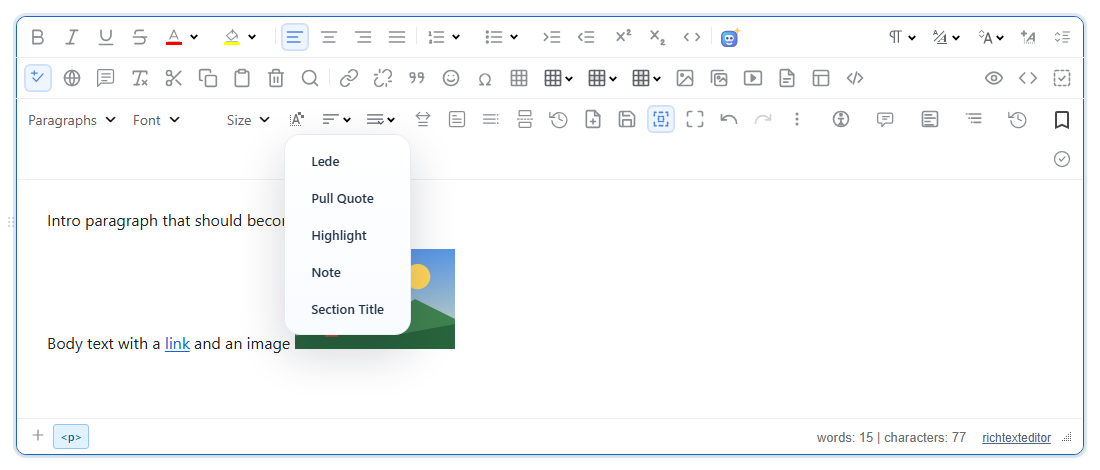
importStylesReplace: true).Turn it on
The feature is the importstyles.js plugin (also in plugins/all_plugins.js). It is off until you set importStyles: true. It has no button of its own; it fills the menus behind paragraphstyle and inlinestyle (main toolbar), imagestyle (image toolbar) and linkstyle (link toolbar).
The stylesheet in this example:
p.lede { font-size: 1.25em; color: #334155; }
blockquote.pull-quote { border-left: 4px solid #2563eb; padding-left: 12px; font-style: italic; }
span.badge { background: #fde68a; padding: 0 4px; border-radius: 4px; }
.highlight { background: #dcfce7; }
img.rounded { border-radius: 12px; }
a.cta { background: #2563eb; color: #fff; padding: 4px 10px; border-radius: 6px; }
article .card p.note:hover { color: #0f766e; }
p.lede.wide { max-width: none; }
.js-toggle { display: none; }
@media (min-width: 600px) { h2.section-title { letter-spacing: .02em; } }
<link rel="stylesheet" href="site.css">
<script src="/richtexteditor/rte.js"></script>
<script src="/richtexteditor/plugins/all_plugins.js"></script>
<div id="editor"><p>Intro paragraph that should become a lede.</p></div>
<script>
var editor = new RichTextEditor("#editor", {
toolbar: "full",
contentCssUrl: "site.css", // so the classes also look right inside the editor
importStyles: true
});
</script>That stylesheet gave these menus (editor.getImportedStyles() reported applied: { imageStyles: 1, linkStyles: 1, inlineStyles: 2, paragraphStyles: 5 }):
| Menu | Imported entries |
|---|---|
| Paragraph styles | Lede, Pull Quote, Highlight, Note, Section Title |
| Inline styles | Badge, Highlight |
| Image styles | Rounded |
| Link styles | Cta |
Picking Lede on the first paragraph saved <p class="lede">Intro paragraph that should become a lede.</p>.
How classes are sorted
- Only the last part of a selector counts:
article .card p.note:hovergivesnotefor paragraphs. Pseudo-classes and attribute filters are ignored. - The element in front of the class decides the menu:
img,figure,picturego to image styles;ato link styles;span,strong,b,em,i,code,mark,small,sub,sup,abbr,q,citeto inline styles;p,div, headings,blockquote, lists,pre, sections and table cells to paragraph styles. A class with no element (.highlight) goes to both inline and paragraph styles. Other elements are skipped. - A selector with two classes on one element (
p.lede.wide) is skipped, since no single class matches it. - Classes inside
@mediaand@supportsare found. - The label is made from the class name:
pull-quotebecomes "Pull Quote". A leadingmy-cls-,u-orc-is dropped. - The editor's own stylesheets are never read (anything from the
/richtexteditor/folder, and styles the editor injects).
Options
| Option | Default | What it does |
|---|---|---|
importStyles | false | Turns the import on. |
importStylesSheets | null (all readable sheets) | Which sheets to read: a string matched against the sheet's URL ("site.css"), a RegExp (/theme/), or a function that gets the CSSStyleSheet and returns true or false. |
importStylesExclude | /^(rte[-_]|ck[-_]|cke[-_]|mce[-_]|tox[-_]|js[-_]|is[-_]|has[-_])/i | Class names never imported. A RegExp, a function of the class name, or a string prefix. The default skipped .js-toggle above. |
importStylesFilter | null | function (className, selectorText, menu). Return false to skip a class, or a string to use as its label. menu is "paragraphStyles", "inlineStyles", "imageStyles" or "linkStyles". |
importStylesReplace | false | false adds the imported classes after the configured ones; true replaces them. |
importStylesLimit | 100 | Most entries per menu. Extra classes are dropped with a console warning. 0 means no limit. |
For example, to hide one class and rename another:
importStylesFilter: function (cls, selector, menu) {
  if (cls === "highlight") return false;
  if (cls === "lede") return "Lead paragraph";
}
API
editor.getImportedStyles()returns what the last import did:{ applied, truncated, droppedCount, unreadableSheets, documentsScanned, replaced }.editor.scanStylesheetClasses(options)lists what would be imported, as{ classes: [{ cls, tag, selector }], unreadableSheets, documents }, without changing the menus. It works withimportStylesoff.editor.importStyles(options)runs the import again, for example after loading another stylesheet. Options use the short names:{ sheets, exclude, filter, replace, limit }.
Things to know
- Stylesheets from another origin cannot be read. The browser blocks their rules; they are counted in
unreadableSheetsand skipped, and the rest of the scan goes on. In the test above a copy of the same stylesheet loaded from a second origin was reported asunreadableSheets: 1. Serve the stylesheet whose classes you want from your own domain. - Both documents are read: the page and the editor's editing area (where
contentCssUrlloads). The import runs when the editor starts and again once it is ready. - Pass your own lists when the page has several editors. In 2.6.12, with
importStylesReplace: false, the imported classes are added to the shared default lists (RTE_DefaultConfig.paragraphStylesand the others), so a second editor created later on the same page shows them even withimportStylesoff. SettingparagraphStyles,inlineStyles,imageStylesandlinkStylesin each editor's config, orimportStylesReplace: true, keeps them apart. - The saved HTML only carries the class name (
class="lede"). The page that shows the content needs the same stylesheet, and an HTML sanitizer must allowclass. - On a utility-CSS page (hundreds of single-purpose classes), narrow the import with
importStylesSheetsorimportStylesFilterrather than raising the limit.
Related: paragraph and inline styles demo, configuration reference.