Table sorting and row numbers
Sort a table's rows by the column the caret is in, add a row-number column that renumbers itself, and move rows and columns from the table menus or by dragging a column. Numbers, money, dates and text are each sorted the way people expect.
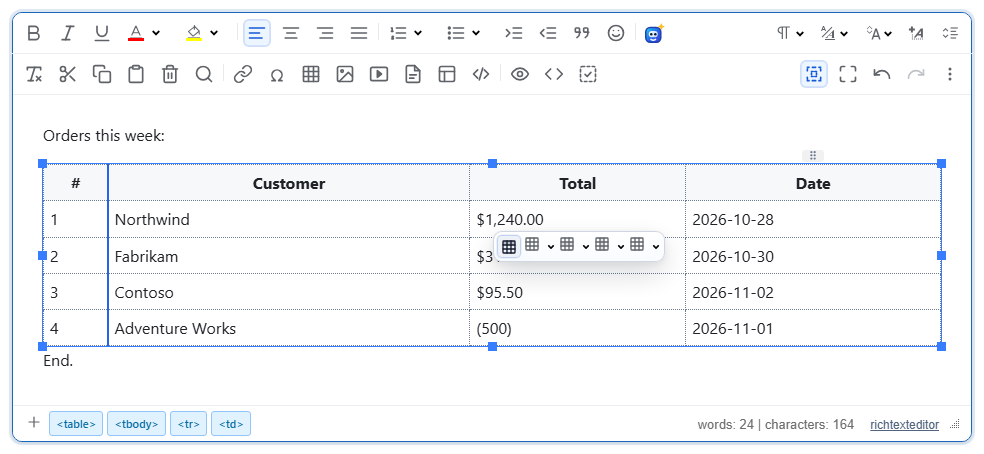
Turn it on
The feature is the tabletools.js plugin (also in plugins/all_plugins.js). It adds "Move Row Up" and "Move Row Down" to the table's row menu and "Move Column Left" and "Move Column Right" to its column menu. Sorting and row numbers have no toolbar button; call them from your own buttons, from the "/" menu (slash-command plugin) or from script.
<link rel="stylesheet" href="/richtexteditor/rte_theme_default.css">
<script src="/richtexteditor/rte.js"></script>
<script src="/richtexteditor/plugins/tabletools.js"></script>

<div id="editor"><table><tbody><tr><td>b</td><td>2</td></tr><tr><td>a</td><td>10</td></tr><tr><td>c</td><td>9</td></tr></tbody></table></div>
<button type="button" onclick="editor.sortTableAtCaret('asc')">Sort A-Z</button>
<button type="button" onclick="editor.sortTableAtCaret('desc')">Sort Z-A</button>
<button type="button" onclick="editor.execCommand('tablerownumbers')">Row numbers</button>
<script>
var editor = new RichTextEditor("#editor", {
    tableNumberSeries: "upper-alpha",
    tableNumberHeader: "Row"
});
</script>
The buttons act on the table and column where the caret was last placed.
Options
| Option | Default | What it does |
|---|---|---|
tableNumberSeries | "numeric" | Labels for row numbers: numeric, upper-alpha, lower-alpha, upper-roman or lower-roman. |
tableNumberHeader | "#" | Text of the number column's cell in header rows. Tables without a header row get no header cell. |
tableColumnDrag | true | false removes the grip that drags a column. |
tableRowDrag | true | false removes the row grip (see Things to know). |
Sorting
- Each column's type is detected from its cells. A column of
$1,240.00,$95.50and(500)sorts as numbers (accounting brackets mean negative), a column of dates sorts by date, anything else as text with numbers inside compared by value. - Empty cells go to the bottom in both directions. Equal values keep their order, so sorting by one column and then another works.
- Rows in
<thead>and<tfoot>never move, nor does a first row made only of<th>cells. - A table with merged cells (
rowspanorcolspanin its body) is not sorted. The call returns{ ok: false, reason: "This table has merged cells. …" }.
Methods: editor.sortTableAtCaret("asc" | "desc"), editor.sortTableByColumn(index, "asc" | "desc") for the table at the caret, and editor.canSortTable(). A sort returns { ok, reason, sortedBy, direction, detectedType }. editor.execCommand("sorttable") also sorts, but always ascending in 2.6.12: the command's value is not passed through, so use sortTableAtCaret("desc") for descending.
Row numbers and moving
editor.execCommand("tablerownumbers") adds or removes the number column; editor.addTableRowNumbers({ series: "lower-roman" }), editor.removeTableRowNumbers() and editor.hasTableRowNumbers() do it from script. The numbers are positional: after a sort or a move, row 1 is whatever row is on top.
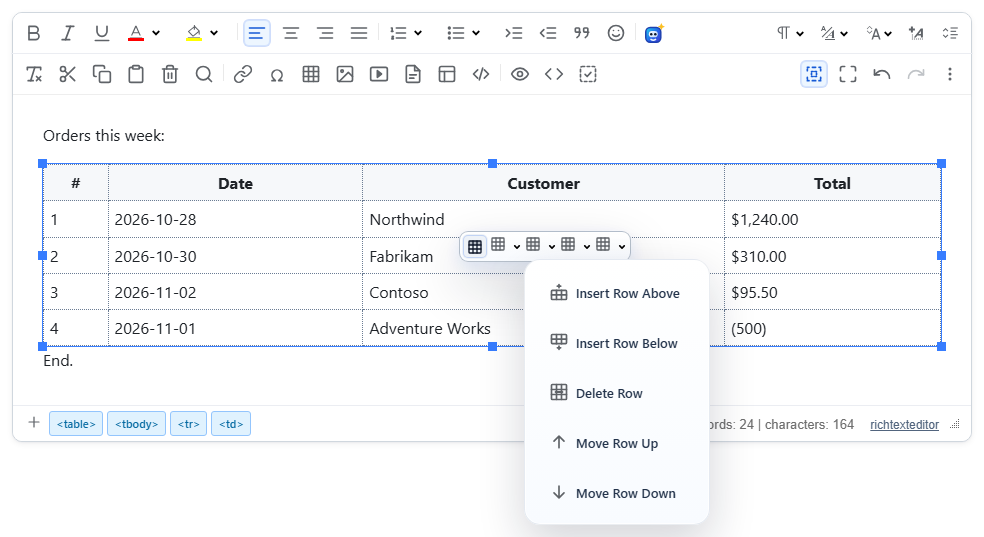
Rows move within their section and header rows stay put. editor.moveTableRow(-1 | 1) and editor.moveTableColumn(-1 | 1) do the same as the menu commands. The number column always stays first. A move is one undo step.
Things to know
- Saved markup with row numbers:
The numbers are ordinary cells, so they are in the saved HTML and visible everywhere. Sanitizers must keep the<table data-rte-rownum-series="upper-alpha"><tbody><tr><td data-rte-rownum="value">A</td><td>a</td><td>10</td></tr>…data-rte-rownumanddata-rte-rownum-seriesattributes, or the editor treats the column as normal data the next time. - In 2.6.12 the row grip does not appear in a normally placed editor (its position is computed in the wrong coordinates). Move rows with the row menu,
moveTableRow(), or the editor's Alt+ArrowUp / Alt+ArrowDown. The column grip works. - Alt+ArrowUp / Alt+ArrowDown are handled by the editor itself and do not renumber the number column. The numbers are corrected by the next sort or menu move.
- Sorting and moving are refused in suggesting (track changes) mode, and do nothing when the editor is read-only or comments-only.
Related: table support demo, gap cursor, slash commands demo.