Inline ghost-text completion
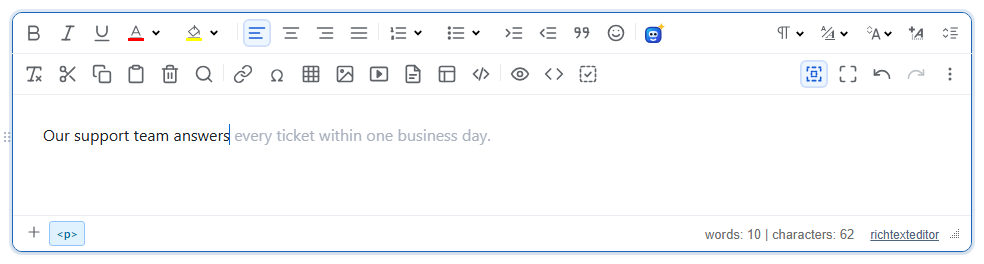
When the user stops typing, the editor asks a function you supply for a continuation of the sentence and shows it in grey after the caret. Tab accepts it, anything else dismisses it. The editor ships no AI model and makes no network calls of its own: your function decides where the text comes from.
Turn it on
The feature is the ghostcomplete.js plugin (also in plugins/all_plugins.js). It has no toolbar button. It runs only when ghostText is set and ghostTextResolver is a function.
<link rel="stylesheet" href="/richtexteditor/rte_theme_default.css">
<script src="/richtexteditor/rte.js"></script>
<script src="/richtexteditor/plugins/ghostcomplete.js"></script>

<div id="editor"><p>Our support team answers</p></div>
<script>
var editor = new RichTextEditor("#editor", {
    ghostText: true,
    ghostTextResolver: function (ctx) {
        return fetch("/api/complete", {
            method: "POST",
            headers: { "Content-Type": "application/json" },
            body: JSON.stringify({ before: ctx.before })
        })
            .then(function (r) { return r.json(); })
            .then(function (data) { return data.text; });
    }
});
</script>
Here /api/complete is your own endpoint. It receives the text before the caret, asks whatever model you use (keep the API key on the server), and answers { "text": " every ticket within one business day." }. Start the returned text with a space when it continues after a word, because it is inserted exactly as returned.
What the resolver gets and returns
ghostTextResolver(ctx) is called with:
ctx.before: the text from the start of the current paragraph (or heading, list item, cell…) up to the caret, cut to the lastmaxContextcharacters;ctx.after: the text from the caret to the end of that block;ctx.full: the text of the whole document.
Return a string or a Promise of a string. An empty string, a non-string, a thrown error or a rejected Promise shows nothing. If the user types again before the answer arrives, the late answer is dropped. A suggestion is only requested when ctx.before has at least minChars non-space characters and nothing is selected.
Options
| Option | Default | What it does |
|---|---|---|
ghostText | false | true, or an object with the three settings below, turns the feature on. |
ghostText.delayMs | 600 | Pause after the last input before the resolver is called. Use a positive number: 0 counts as unset and gives 600. |
ghostText.minChars | 3 | Fewest non-space characters before the caret. |
ghostText.maxContext | 2000 | Most characters passed in ctx.before. |
ghostTextResolver | null | Your function, as described above. |
Keys and API
- Tab accepts the suggestion. It is inserted as typed text, so one Ctrl+Z removes it again.
- Escape, the arrow keys, Home, End, PageUp and PageDown dismiss it. Typing any character dismisses it and starts a new wait.
- Clicking or tapping the grey text accepts it (the only way on a phone, which has no Tab key). Clicking anywhere else dismisses it.
Methods: editor.setGhostTextResolver(fn) replaces the resolver at run time; editor.requestGhostText() asks for a suggestion now, without the wait; editor.acceptGhostText(), editor.dismissGhostText() and editor.hasGhostText() do what their names say. With the slash-command plugin loaded, the "/" menu has an "AI complete" entry that calls requestGhostText(). If no resolver is set, that call shows a short note in the editor saying that completion is not configured.
Things to know
- While it is shown, the suggestion is this element after the caret:
<span class="rte-ghost" contenteditable="false" data-rte-ghost="1" aria-hidden="true"> every ticket within one business day.</span>getHTMLCode(),getHTMLContent()andgetJSON()remove it, so saved HTML only contains text the user accepted. Screen readers skip it (aria-hidden). - The word and character count in the bottom bar includes the grey text while it is shown.
- Each pause in typing is one call to your endpoint. Rate-limit and cache on the server, and raise
delayMsif the calls cost money. requestGhostText()also needsghostTextto be set; with only a resolver it does nothing.
Related: AI Toolkit (command-driven AI actions), AI providers and streaming, writing assistance demo.