Inline code
Marks a word or a selection as code, for names like getHTMLCode() inside a sentence. The text is wrapped in a plain <code> element, and pressing the button again removes it.
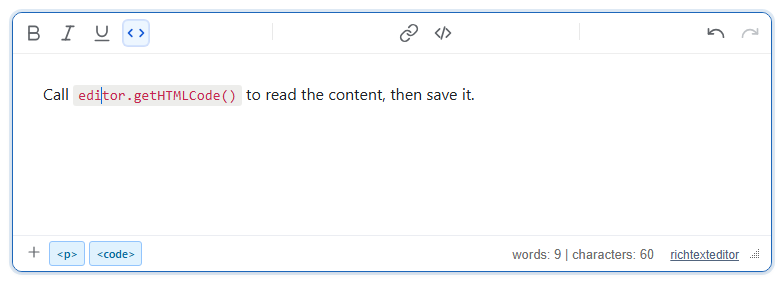
editor.getHTMLCode(); one click on the </> button coded the whole word. The button shows as active while the caret is in code.Turn it on
The feature is the inlinecode.js plugin (also in plugins/all_plugins.js). Its command and toolbar item is inlinecode (tooltip "Inline code"). Where the button appears:
toolbar: "full": in the main row, next to superscript and subscript.- The default toolbar: in the "More" (⋮) menu.
- Your own toolbar: add
inlinecodewherever you want it.
<link rel="stylesheet" href="/richtexteditor/rte_theme_default.css">
<script src="/richtexteditor/rte.js"></script>
<script src="/richtexteditor/plugins/inlinecode.js"></script>

<div id="editor"><p>Call editor.getHTMLCode() to read the content, then save it.</p></div>
<script>
var editor = new RichTextEditor("#editor", {
    toolbar: "mytoolbar",
    toolbar_mytoolbar: "{bold,italic,underline,inlinecode}|{insertlink,insertcode}|{undo,redo}"
});
</script>
The plugin has no options. The command is named inlinecode because code is already the editor's HTML source view.
Using it
- With a selection, the selected text is wrapped and stays selected, so a second press removes the code again.
- With only a caret, the command works on the word under the caret: the run of characters up to the nearest space on each side. The caret stays where it was. On a blank spot nothing happens; no empty
<code>is created. - Removing. If every selected character is already code, the command removes it. Removing part of a code run splits it: selecting "content" inside
<code>the content</code>and pressing the button leaves<code>the </code>content. Italic or bold inside the run stays on the text that is un-coded, but the code parts on either side can keep an empty copy of it: un-coding "b" in<code>a <i>b</i> c</code>saves as<code>a <i></i></code><i>b</i><code><i></i> c</code>. - Typing. With the editor's inline Markdown shortcuts on (
markdownInlineEnabled, the default), typing`npm install`produces<code>npm install</code>when the closing backtick is typed. That works without the plugin; the plugin adds the button and the way to remove code.
From script: editor.execCommand("inlinecode") or editor.toggleInlineCode() toggle at the current selection, and editor.isInlineCode() tells whether the caret is in code. There is no keyboard shortcut for the command.
Things to know
- The saved markup is a bare element with no class:
Two code runs that end up side by side are merged into one element, and a selection that is only spaces is not wrapped.<p>Call <code>editor.getHTMLCode()</code> to read the content, then save it.</p> - Nothing is wrapped inside a
<pre>code block or inside existing code, because both are already code. Useinsertcodefor multi-line code blocks. - The grey background and monospace font come from the editor's content stylesheet (
runtime/richtexteditor_content.css, rulecode { … }). The page that displays the saved HTML needs its owncodestyle. - Sanitizers must allow the
codeelement. Most allow it by default.
Related: toolbar items reference, execCommand, code snippets demo.