Right-to-left interface
Mirrors the editor's own interface for Arabic, Hebrew, Persian and Urdu users: the toolbar runs from the right, and menus, dialogs, the status bar and the resize corner are flipped to match. It changes the editor around the content, not the content itself.
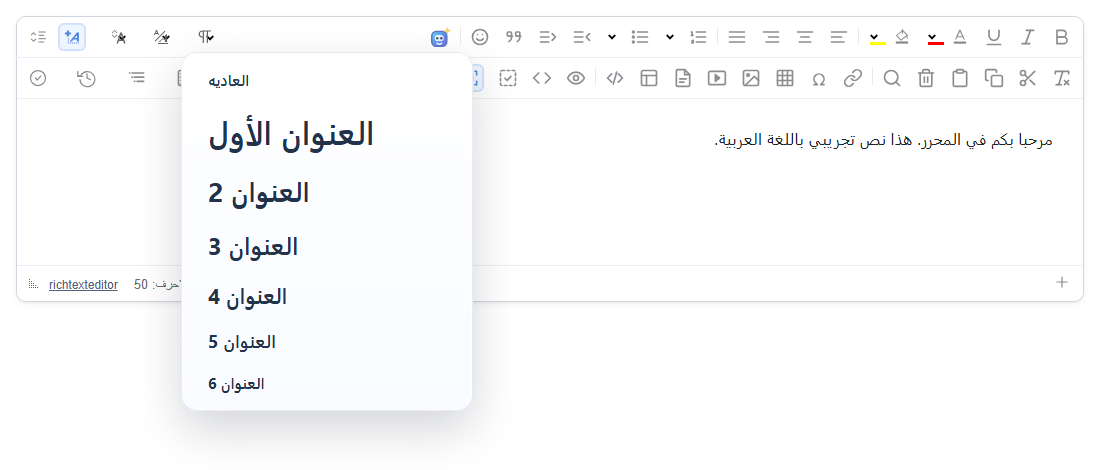
rtlUserInterface: true, paragraph menu open.Turn it on
The feature is the rtlui.js plugin (also in plugins/all_plugins.js). By default it mirrors the interface when the editing area itself is right-to-left. To mirror it always, set rtlUserInterface: true. Load a language pack for the words:
<link rel="stylesheet" href="/richtexteditor/rte_theme_default.css">
<script src="/richtexteditor/rte.js"></script>
<script src="/richtexteditor/plugins/all_plugins.js"></script>
<script src="/richtexteditor/lang/rte-lang-ar.js"></script>

<div id="editor"><p dir="rtl">مرحبا بكم في المحرر.</p></div>
<script>
var editor = new RichTextEditor("#editor", { rtlUserInterface: true });
</script>
There is no toolbar button for it. Users can switch it from the slash menu ("Mirror editor for RTL"), and your page can switch it with the API below.
Options
| Option | Default | What it does |
|---|---|---|
rtlUserInterface | "auto" | "auto": mirror when the editing area's computed direction is rtl. true: always mirror. false: never mirror. |
"auto" looks at the whole editing area, not at single paragraphs; a paragraph with dir="rtl" does not count. Two things make the editing area right-to-left: the text direction plugin's defaultTextDirection: "rtl" (it sets dir="rtl" on the editing area), or a content stylesheet:
var editor = new RichTextEditor("#editor", { defaultTextDirection: "rtl" });
// or: new RichTextEditor("#editor", { contentCssText: "body{direction:rtl}" });
editor.isRtlUserInterface(); // true
The check runs when the editor starts and after each setHTMLCode(). Changing the document direction later with editor.setBaseDirection("rtl") mirrors the interface only at the next setHTMLCode(); call editor.setRtlUserInterface(true) at the same time.
API
| Method | What it does |
|---|---|
editor.setRtlUserInterface(true) | Mirror (false to undo). Returns the new state. |
editor.toggleRtlUserInterface() | Switch, returns the new state. editor.execCommand("rtlui") does the same. |
editor.isRtlUserInterface() | true when the interface is mirrored. |
editor.getRtlUiCss() | The CSS the plugin adds, as a string. |
What changes
The plugin sets dir="rtl" on the editor's outer element (div.richtexteditor) and adds one stylesheet to the page, <style id="rte-rtl-ui-styles">, whose rules all start with .richtexteditor[dir="rtl"]. Editors that are not mirrored are not affected by it.
- The toolbar, dropdown menus, submenus and float panels follow the right-to-left direction. Dropdowns and dialogs are inside the editor's element, so they are mirrored too (checked with the paragraph menu and the Insert Link dialog).
- Menu rows, the status bar, the tag list and the word counter read from the right; the resize corner moves to the other side.
- Only icons that show reading order are flipped: indent, outdent and the submenu arrow. Bold, italic and the alignment icons stay as they are.
Things to know
- The content is not changed. The direction of the text belongs to the content and is set by the text direction plugin (
textdirection.js); for exampleeditor.setTextDirection("rtl")saves<p dir="rtl">abc</p>. Mirroring the interface adds nothing to the saved HTML. - With "auto",
setHTMLCode()checks again. In 2.6.12 the plugin re-applies its setting after everysetHTMLCode(), so a switch made withtoggleRtlUserInterface()or the slash menu is undone when new content is loaded into an "auto" editor. If your page has its own switch, setrtlUserInterfacetotrueorfalsewhen you create the editor. - Putting
rtluiin a toolbar string creates a button with a generic icon and the name "rtlui", because 2.6.12 has no label or icon for it. - Under a strict Content-Security-Policy that blocks
<style>elements, the plugin re-adds its rules through the CSSOM.
Related: Text part language, accessibility and languages demo, UI language demo.