Shadow DOM
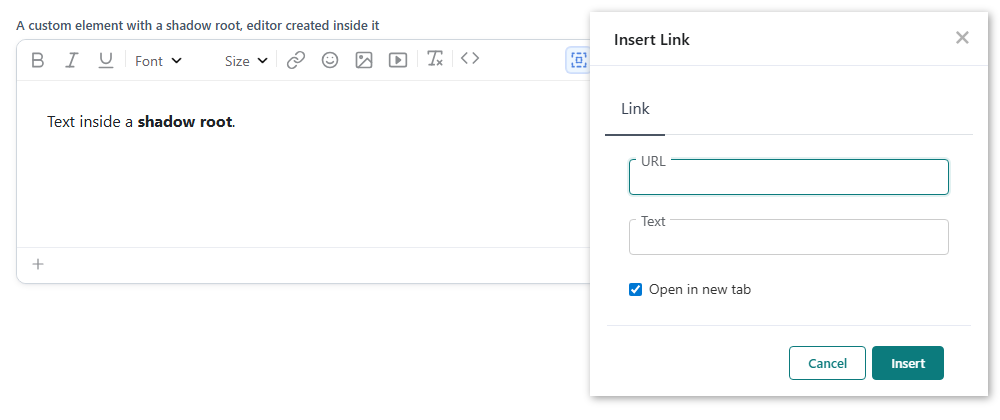
Lets the editor run inside a shadow root, for example inside your own web component or a micro-frontend. Page stylesheets do not reach into a shadow root, so without help the editor there is unstyled; this plugin copies the editor's own stylesheets into the shadow root that contains it, and keeps copying the ones plugins add later.
Turn it on
The feature is the shadowdom.js plugin (also in plugins/all_plugins.js). Load the editor's stylesheet in the page as usual and create the editor on an element inside the shadow root; the plugin does the rest. There is no button.
<link rel="stylesheet" href="/richtexteditor/rte_theme_default.css">
<script src="/richtexteditor/rte.js"></script>
<script src="/richtexteditor/plugins/all_plugins.js"></script>

<note-editor id="host"></note-editor>
<script>
class NoteEditor extends HTMLElement {
  connectedCallback() {
    const root = this.attachShadow({ mode: "open" });
    root.innerHTML = '<div class="box"><p>Text inside a <b>shadow root</b>.</p></div>';
    this.editor = new RichTextEditor(root.querySelector(".box"), { toolbar: "basic", height: "220px" });
  }
}
customElements.define("note-editor", NoteEditor);
</script>
The ready-made <rich-text-editor> element in rte-webcomponent.js uses the same plugin: add the shadow attribute and it mounts the editor in its own shadow root.
<script src="/richtexteditor/rte-webcomponent.js"></script>
<rich-text-editor shadow toolbar="basic" height="220px"><p>Hello</p></rich-text-editor>
If shadowdom.js is not loaded, that element prints a console warning and stays in the light DOM rather than render unstyled.
Options
| Option | Default | What it does |
|---|---|---|
shadowStyleAdoption | true | Copy the editor's stylesheets into the shadow root. false turns the copying off. |
shadowStyleSources | null | Extra stylesheet URLs to add to the shadow root, a string or an array, for your own skin overrides. |
What is copied
<link rel="stylesheet">elements served from the folderrte.jswas loaded from, or whose file names are the editor's (rte_theme,rte_mobile,richtexteditor_content,richtexteditor_preview,aitoolkit). They are re-created as new<link>elements with the same URL, so they come from the browser cache.<style>elements whose id starts withrte-or__rte(the plugins' styles), and<style>elements without an id whose CSS mentions the editor's selectors, which is how bundlers such as Vite inject an imported theme.- Stylesheets the page adopted with
document.adoptedStyleSheets.
Nothing else from the page is copied, so your component keeps its encapsulation. Each copy carries data-rte-adopted="1". In the test page above, 9 stylesheets were copied (the theme, the AI toolkit stylesheet and the plugins' <style> elements), and the toolbar was 41 pixels high. With shadowStyleAdoption: false it was 7,561 pixels high, a column of unstyled buttons.
The plugin watches the page's <head>, so a plugin style added after start-up, when its panel first opens, is copied too. Dialogs and menus are created inside the editor's element, so they are inside the shadow root and use the copied styles.
API
editor.isInShadowDom()—truewhen the editor is inside a shadow root.editor.getShadowRoot()— that shadow root, ornull.editor.getAdoptedStyleCount()— how many stylesheets have been copied (9 above).editor.adoptEditorStyles(target)— copy the editor's stylesheets into another root, for example a second shadow root that shows a preview. Without an argument it uses the editor's own shadow root.
Things to know
- The editing area is an iframe, so the document's own CSS is loaded into it as usual (
contentCssUrl); this plugin is only about the editor's toolbar, menus and dialogs. - Outside a shadow root the plugin does nothing and creates no observer.
- Your own overrides of the editor's look that live in the page's stylesheet do not reach into the shadow root. List them in
shadowStyleSources, or put them in the shadow root yourself. - The saved HTML is not affected;
getHTMLCode()returned<p>Text inside a <b>shadow root</b>.</p>.
Related: Quick start, Form validation.