Text part language
Marks the language of a word or passage that differs from the rest of the document, by wrapping it in <span lang="…">. Screen readers use lang to switch to the right voice and pronunciation, so a French quotation in an English page is read in French instead of being mispronounced. WCAG 2.2 success criterion 3.1.2 (Language of Parts, level AA) requires this markup.
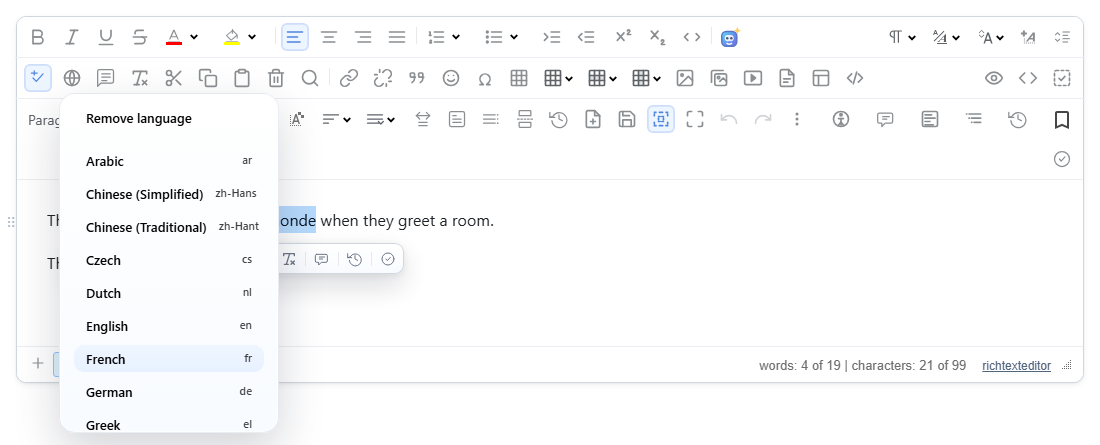

Turn it on
The feature is the textpartlanguage.js plugin (also in plugins/all_plugins.js). The toolbar item is textpartlanguage ("Language"), a menu button. It is in the full and office toolbars; for your own toolbar, add it to the string:
<link rel="stylesheet" href="/richtexteditor/rte_theme_default.css">
<script src="/richtexteditor/rte.js"></script>
<script src="/richtexteditor/plugins/textpartlanguage.js"></script>

<div id="editor"><p>The French say bonjour tout le monde when they greet a room.</p></div>
<script>
var editor = new RichTextEditor("#editor", { toolbar_default: "{bold,italic}|{textpartlanguage}" });
</script>
Options
| Option | Default | What it does |
|---|---|---|
textPartLanguages | 24 languages: ar, zh-Hans, zh-Hant, cs, nl, en, fr, de, el, he, hi, it, ja, ko, fa, pl, pt, ru, es, sv, tr, uk, ur, vi | The menu. Each entry is { code, label, dir }; set dir: "rtl" for right-to-left languages (the defaults do this for Arabic, Hebrew, Persian and Urdu). |
textPartLanguageHighlight | true | Dotted underline on marked phrases inside the editing area. Editor-only; false turns it off. |
text_textpartlanguage, text_removelanguage | "Language", "Remove language" | Button label and the first menu row. |
A shorter list, with a regional code:
textPartLanguages: [
  { code: "en", label: "English" },
  { code: "fr-CA", label: "French (Canada)" },
  { code: "ar", label: "Arabic", dir: "rtl" }
]
With a language pack loaded, the built-in entries are named in that pack's language (through Intl.DisplayNames); a label you set yourself is shown as written.
Using it
- Select the text, open Language and pick a language. Picking the language the selection already has removes it again.
- With the caret inside a marked phrase (no selection), picking another language changes that phrase, and "Remove language" unwraps it. A caret outside any marked phrase does nothing: the plugin never creates an empty span.
- A selection across several paragraphs, list items or table cells is marked block by block, one span in each, so the blocks are not split.
- Keyboard: when the menu opens, focus goes to the current language, or to "Remove language". ArrowUp and ArrowDown move and wrap around, Home and End jump to the ends, Enter or Space picks, and Escape closes the menu and puts focus back in the editing area. Each row has
role="menuitemradio"andaria-checked. - Undo removes a language that was set from the menu or the API in one step.
API, for your own UI:
| Method | What it does |
|---|---|
editor.setTextLanguage("fr") | Marks the selection, as the menu does. |
editor.removeTextLanguage() | Removes the language at the caret or in the selection. |
editor.getTextLanguage() | The language at the caret, e.g. "fr", or null. |
editor.getMarkedLanguages() | Every language used in the document, e.g. [{"code":"fr","label":"French"},{"code":"he","label":"Hebrew"}]. |
editor.listTextLanguages() | A copy of the menu list. |
Things to know
The saved HTML is a plain span with no class, so it does not depend on any stylesheet. Right-to-left languages also get dir="rtl", because lang alone does not change the direction. From the run shown above:
<p>The French say <span lang="fr">bonjour tout le monde</span> when they greet a room.</p>
<p>The Hebrew word shalom is written <span lang="he" dir="rtl">שלום</span>.</p>- Sanitizers must keep
langanddironspan. If your server strips them, the document silently loses its language markup. - The language of the whole document is a separate setting (the
langof the page that shows the content). This plugin marks only the parts that differ from it. - Use
setTextLanguage()from code, notexecCommand("textpartlanguage", "de"): in 2.6.12 the value does not reach the plugin, so that call removes the language instead of setting it. - Marked spans inside a new selection are unwrapped first, so a phrase never ends up with two nested languages.
- In suggesting (track changes) mode the language cannot be changed: the change cannot be tracked yet, so the plugin refuses it with a message.
Related: Accessibility statement, Accessibility checker, Right-to-left interface, accessibility and languages demo.