Spell check
Turns on the browser's own spell checker in the editing area, and gives you a Spell Check command that can open a review panel fed by your own spelling service. The editor ships no dictionaries: without a service, checking is whatever the user's browser and operating system provide, in the languages they have installed.

Turn it on
The feature is the spellcheck.js plugin (also in plugins/all_plugins.js). The button is spellcheck ("Spell Check"). It is in the full toolbar and in the "more" panel of the default toolbar, and the slash menu lists it as "Spell check". To put it on your own toolbar, add spellcheck to the toolbar string.
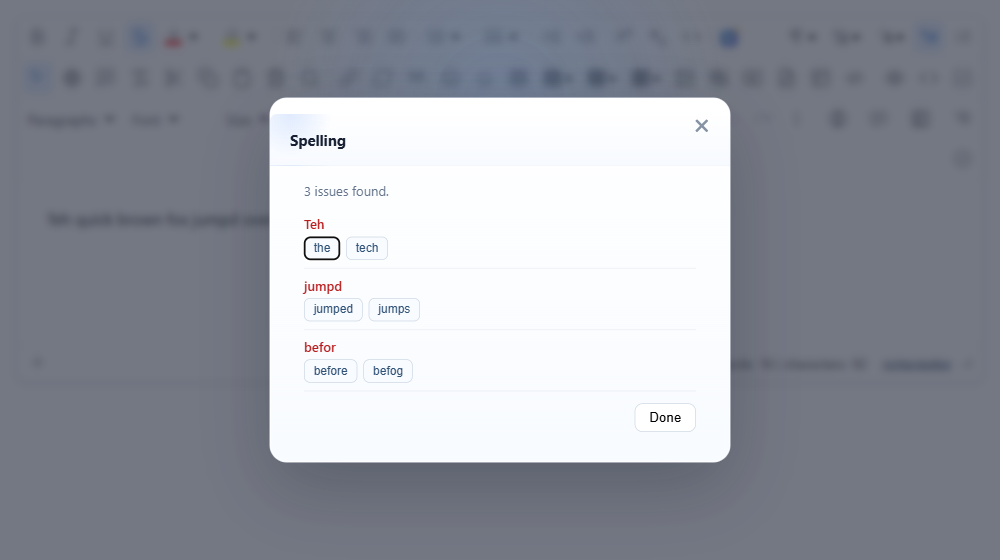
With the plugin loaded, the native checker is on and nothing else is needed. To get the review panel, give it a resolver: a function that receives the document's plain text and returns the issues, or a promise of them.
// A stand-in for your spelling service: returns [{ word, offset, length, suggestions }].
var dictionary = { teh: ["the", "tech"], jumpd: ["jumped", "jumps"], befor: ["before", "befog"] };
var editor = new RichTextEditor("#editor", {
  toolbar: "full",
  spellCheckResolver: function (text) {
    var issues = [];
    text.replace(/[A-Za-z]+/g, function (w, offset) {
      var s = dictionary[w.toLowerCase()];
      if (s) issues.push({ word: w, offset: offset, length: w.length, suggestions: s });
    });
    return Promise.resolve(issues);
  }
});
In a real application the resolver calls your server, which runs a checker such as Hunspell or LanguageTool and maps its answer to that shape:
spellCheckResolver: function (text) {
  return fetch("/spell", { method: "POST", body: text }).then(function (r) { return r.json(); });
}
Options
| Option | Default | What it does |
|---|---|---|
spellCheckEnabled | true | Sets spellcheck="true" or "false" on the editing area when the editor starts. |
spellcheck | true | The core editor's own switch for the same attribute. The attribute is "true" only when both options are true. |
spellCheckResolver | null | function (text) returning an array of { word, offset, length, suggestions }, or a promise of one. Without it the command only turns the native checker on. |
text_spellcheck, text_spellchecktitle, text_spellchecknative, text_spellcheckclean, text_sp_* | English | Button label, panel title and messages. The language packs set them. |
Using it
- No resolver. The command sets
spellcheck="true"on the editing area, focuses it, and shows a short message at the bottom of the page: "Browser spell-check is on — misspellings are underlined as you type." This also switches the native checker back on if you started withspellCheckEnabled: false. Corrections are made from the browser's own context menu. - With a resolver. The command sends
innerTextof the document to the resolver and opens the Spelling panel. Each issue shows the word and up to six suggestions. Clicking a suggestion replaces the word and greys the row out. "No spelling issues found." is shown when the list is empty, and "Nothing to check." when the document is empty. - A resolver that rejects shows "Spell-check service error."; one that takes longer than 12 seconds shows "Spell-check timed out."; one that throws shows "Spell-check error.".
Things to know
- Replacement is by word, not by position. A suggestion replaces the first whole-word match of
wordin the document (text insidecodeandpreis skipped).offsetandlengthare not used, so if a word is misspelled twice, each click fixes the next occurrence from the top. - Replacements are not undo steps. In 2.6.12, Undo after clicking a suggestion does not bring the old word back.
- Languages. The plugin has no language setting. The native checker uses the dictionaries of the user's browser and operating system; with a resolver, the language is whatever your service checks. Pass it from your page, for example
fetch("/spell?lang=fr", …). - Your text goes to your service. The whole plain text of the document is passed to the resolver on every check. Nothing is sent anywhere by the plugin itself.
- Nothing is added to the saved HTML. The
spellcheckattribute is on the editing area, not in the content.
Related: spell checking demo, slash commands.