Layout tables
Marks a table as a layout table, one that only positions content (as in e-mail newsletters and signatures), as opposed to a data table with rows and column headers. A layout table gets role="presentation", so screen readers read its cells as plain text instead of announcing a grid.
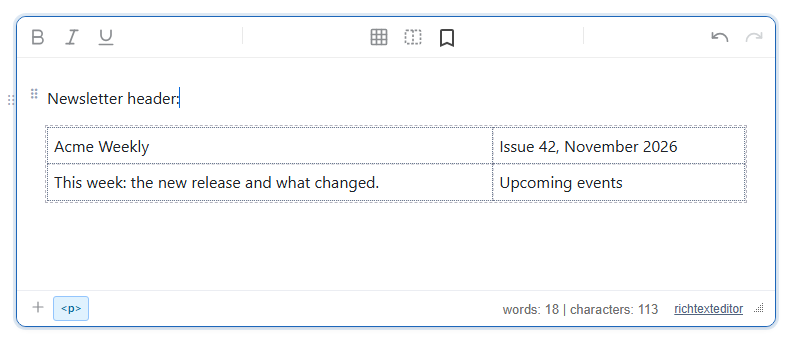
Turn it on
The feature is the layouttable.js plugin (also in plugins/all_plugins.js). It is not in any built-in toolbar. Its commands are:
insertlayouttable: insert a 2 × 2 layout table at the caret.toggletablelayout: switch the table at the caret between layout and data.tablelayoutmodeandtabledatamode: make the table at the caret a layout or a data table.
The commands have no icon or label of their own. To put them on a toolbar, give them one with svgCode_<command> and text_<command>:
<link rel="stylesheet" href="/richtexteditor/rte_theme_default.css" />
<script src="/richtexteditor/rte.js"></script>
<script src="/richtexteditor/plugins/layouttable.js"></script>

<div id="div_editor1"><p>Newsletter header:</p><p><br></p></div>
<script>
var editor1 = new RichTextEditor("#div_editor1", {
  toolbar: "custom",
  toolbar_custom: "{bold,italic,underline}|{inserttable,insertlayouttable,toggletablelayout}|{undo,redo}",
  text_insertlayouttable: "Insert layout table",
  text_toggletablelayout: "Layout / data table",
  svgCode_insertlayouttable: '<svg viewBox="0 0 24 24" fill="none" stroke="currentColor" stroke-width="2" stroke-dasharray="3 2"><rect x="3" y="4" width="18" height="16" rx="1"/><path d="M12 4v16"/></svg>'
});
</script>
Without svgCode_toggletablelayout that button shows the editor's generic placeholder icon. With the slash menu plugin loaded, the same actions need no toolbar: /layout offers "Layout table" and "Mark table as layout", and /data offers "Mark table as data".
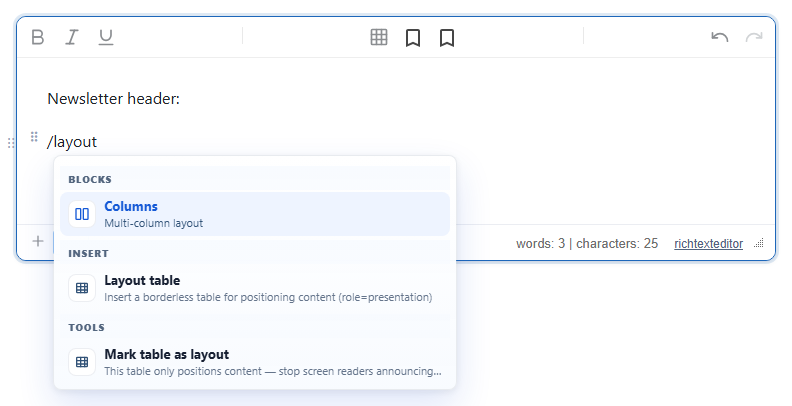
/layout, with the slash command plugin loaded (here from all_plugins.js).Options
| Option | Default | What it does |
|---|---|---|
layoutTableOutline | true | Draws a dashed outline around layout tables and their cells while editing. The outline is a style inside the editor only; it is never saved. |
What the switch does
To layout (tablelayoutmode, or toggle on a data table):
- adds
role="presentation"to the table and removessummary; - turns every
<th>into<td>and removesscope,headersandabbrfrom the cells; - moves the
<caption>text into a paragraph above the table, so the words are kept; - moves
<thead>rows into the body.
Only the table itself changes; a data table nested inside one of its cells keeps its headers.
To data (tabledatamode, or toggle on a layout table) removes the role. In the same editing session it also turns the cells that were headers back into <th>. That memory is not saved: after the content is reloaded, nothing is restored. The API's promoteFirstRow option then makes the first row headers with scope="col"; the slash menu's "Mark table as data" uses it.
A data table with a caption and a header row, switched to layout and back to data with a reload in between, went through these steps:
<!-- to layout -->
<p>Prices</p>
<table role="presentation"><tbody><tr><td>Plan</td><td>Price</td></tr><tr><td>Basic</td><td>$10</td></tr></tbody></table>
<!-- reloaded, then setTableLayoutMode("data", null, { promoteFirstRow: true }) -->
<table><tbody><tr><th scope="col">Plan</th><th scope="col">Price</th></tr><tr><td>Basic</td><td>$10</td></tr></tbody></table>
Without the reload, switching back gave <th> cells again but without their scope, and the caption stayed a paragraph.
API
editor1.insertLayoutTable(rows, cols, { width }): insert a layout table (2 × 2 andwidth: 100%by default) and return it.editor1.setTableLayoutMode("layout" | "data", table, { promoteFirstRow }):tabledefaults to the one at the caret.editor1.getTableLayoutMode(table)returns"layout","data"ornull(no table);editor1.isLayoutTable(table)returns a boolean. Bothrole="presentation"androle="none"count as layout.editor1.toggleTableLayoutMode(),editor1.listLayoutTables()(all layout tables in the document),editor1.showLayoutTableOutlines(false)(hide the dashed outline;trueshows it).
Things to know
- An inserted layout table is saved as:
No class is added;<table role="presentation" cellpadding="0" cellspacing="0" style="width: 100%; border-collapse: collapse"><tbody><tr><td style="vertical-align: top">Acme Weekly</td><td style="vertical-align: top">Issue 42, November 2026</td></tr>…</tbody></table>role="presentation"is the whole marker.cellpadding,cellspacingandborder-collapseare there for e-mail clients. - The accessibility checker does not ask a layout table for header cells, and instead reports a layout table that still has data-table markup.
- Sanitizers must keep the
roleattribute ontable.
Related: word processor tools demo, table support demo, e-mail campaign demo.