Read aloud
Reads the document, or the selected text, out loud with the browser's own speech synthesizer, one sentence at a time, and selects each sentence as it is spoken. A small bar at the bottom of the window has pause, stop, voice and speed controls. No library, server or key is involved.
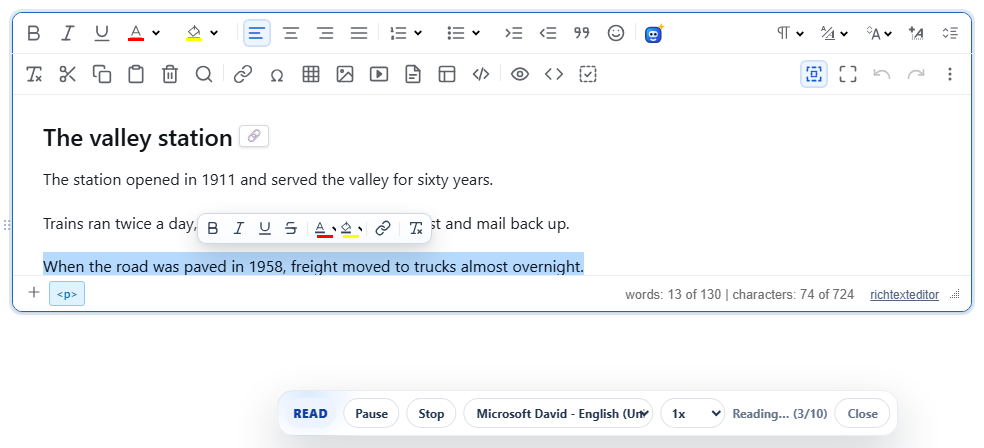
Turn it on
The feature is the readaloud.js plugin (also in plugins/all_plugins.js). Its command and toolbar item is readaloud (tooltip "Read aloud"). With the default toolbar the button is in the "More" (⋮) menu; in your own toolbar, add readaloud. The command opens the bar and starts reading at once; running it again closes the bar.
<link rel="stylesheet" href="/richtexteditor/rte_theme_default.css">
<script src="/richtexteditor/rte.js"></script>
<script src="/richtexteditor/plugins/readaloud.js"></script>

<div id="editor"><p>The station opened in 1911. Trains ran twice a day.</p></div>
<script>
var editor = new RichTextEditor("#editor", {
    toolbar: "mytoolbar",
    toolbar_mytoolbar: "{bold,italic,underline}|{readaloud}"
});
</script>
The bar's styles are in rte_theme_default.css, so keep that stylesheet on the page.
The bar
- Play / Pause pauses and resumes; after the end it starts again.
- Stop ends reading and puts back the selection the user had before.
- Voice lists every voice from
speechSynthesis.getVoices()as "name (language)", with the browser's default marked. The list fills in when the browser reports its voices. - Speed: 0.75×, 1×, 1.25×, 1.5× or 2×, starting at 1×. A change applies from the next sentence.
- The status shows "Reading… (3/10)", "Paused" or "Nothing to read". Close stops and removes the bar.
If something is selected when reading starts, only the selection is read. Sentences are split at ., !, ?, a line break, and the Chinese and Japanese marks 。!?. Reading pauses when the page is hidden (another tab) and stops when the page is left.
Options and API
| Option | Default | What it does |
|---|---|---|
readAloudHighlight | true | Select each sentence in the editor while it is spoken. false reads without moving the selection. |
readAloudRate | 1.0 | Speed for editor.readAloud() when the bar is not open. While the bar is open its speed menu is used instead. |
editor.readAloud({ rate: 1.5, voice: "Microsoft Zira - English (United States)" });
editor.stopReadAloud();
editor.readAloud(options) reads without opening the bar. rate is clamped to 0.5–2; voice is a voice name exactly as speechSynthesis.getVoices() reports it. If the name is not found, the browser's default voice is used.
Things to know
- It needs
window.speechSynthesis. Where a browser does not have it, the command shows a dialog saying read-aloud is unavailable. - Voices and languages come from the browser and the operating system, not from the editor, so the list differs between computers. The plugin does not set a language: the chosen voice decides how the text is pronounced, so pick a voice that matches the document's language.
- Text is collected node by node without separators. A heading without a full stop is read together with the next sentence, and the two words where they meet run together ("station" + "The").
- The sentence is shown with the normal selection, so the editor's floating format toolbar can appear over the text while reading.
- Nothing is added to the document; the saved HTML is unchanged.
- The bar's words come from language keys such as
text_ra_play,text_ra_pause,text_ra_stopandtext_ra_readingof.
Related: dictation (speech to text), accessibility, toolbar items reference.