Emoji picker
A toolbar button that opens a searchable grid of 1,037 emoji in eight categories. Click one, or pick it with the keyboard, and it is inserted at the caret as a plain Unicode character.
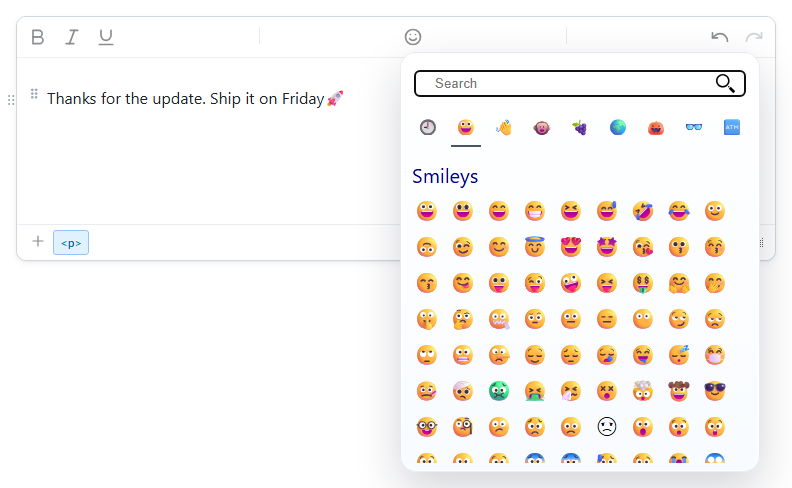
Turn it on
The feature is the insertemoji.js plugin (also in plugins/all_plugins.js). The toolbar item is insertemoji (tooltip "Insert Emoji"). It is already in the default, basic, full and mobile toolbars, so loading the plugin is enough there. In your own toolbar, add insertemoji where you want it:
<link rel="stylesheet" href="/richtexteditor/rte_theme_default.css" />
<script src="/richtexteditor/rte.js"></script>
<script src="/richtexteditor/plugins/insertemoji.js"></script>

<div id="div_editor1"><p>Thanks for the update. Ship it on Friday </p></div>
<script>
var editor1 = new RichTextEditor("#div_editor1", {
  toolbar: "custom",
  toolbar_custom: "{bold,italic,underline}|{insertemoji}|{undo,redo}"
});
</script>
Without the plugin the button does nothing. A custom toolbar is used only when the browser window is at least maxWidthForMobile (992 px) wide; below that the editor shows toolbarMobile, which has the emoji button by default.
Options
The picker has no behaviour switches. What you can set are its words and its language:
| Option | Default | What it does |
|---|---|---|
text_insertemoji | "Insert Emoji" | Tooltip of the toolbar button. |
text_searchemojis | "Search" | Placeholder of the search box. |
text_emoji_smileys … text_emoji_symbols, text_emoji_recent | The English category name ("Smileys", "Recently used" …) | Category headings and tab tooltips. The eight categories are smileys, people, animals, food, travel, activities, objects, symbols. |
text_emoji_items | "{0} items" | The result count shown above search results. |
text_uilocale | not set (set by a language pack) | For de es fr it ja ko nl pt pt-pt ru zh-Hans zh-Hant, the picker loads lang/emoji/rte-emoji-<locale>.js the first time it opens, and shows and searches emoji names in that language. English names still match. |
url_base | "/richtexteditor" | Folder the emoji name file above is loaded from. |
The language packs set all of these for you. With lang/rte-lang-de.js loaded, the search box reads "Suche", the tabs read "Personen", "Tiere" and so on, and searching "rakete" finds 🚀.
Using it
- Search. The search box has focus when the picker opens. Typing filters all categories at once by name ("rocket" finds 🚀) and shows a count of matches.
- Categories. The tab row switches category. Only the open category is drawn, so the panel opens quickly.
- Recently used. The last 16 emoji inserted from the picker are stored in
localStorageunder the keyrte-emoji-recent. When there are any, the picker opens on that tab. If storage is blocked, the list lasts for the current page only. - Keyboard. Tab moves from the search box into the grid. Arrow keys move between emoji (up and down go to the nearest emoji on the row above or below), Home and End jump to the first and last, Enter or Space inserts, Escape closes the picker.
- From script.
editor1.execCommand("insertemoji")opens the same picker. The slash menu lists it as "Emoji".
Things to know
- The emoji is saved as the character itself, with no wrapper element. After picking 🚀 the content is:
Store the HTML as UTF-8 (in a database, a column type that holds four-byte characters, such as<p>Thanks for the update. Ship it on Friday🚀 </p>utf8mb4in MySQL). - How an emoji looks depends on the reader's operating system font. The same character can look different on Windows, macOS and Android.
- The list is fixed in the plugin. There is no option to add or remove emoji from the picker.
- For typing emoji as
:shortcode:without opening the picker, see emoji autocomplete.
Related: toolbar items reference, mobile toolbar, special characters demo.