Smart chips
Small rounded labels for a date, a person or a link, placed inline in the text. Each chip is a single piece that cannot be edited letter by letter, and it stores a machine-readable value next to the text people see, such as 2026-11-11 behind "Nov 11, 2026" or a user ID behind a name.
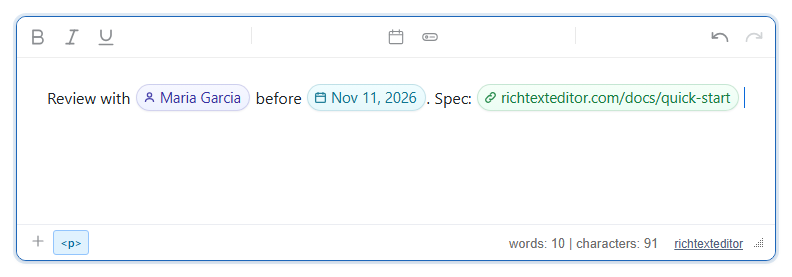
Turn it on
The feature is the smartchips.js plugin (also in plugins/all_plugins.js). It adds two commands:
insertdatechip(tooltip "Date Chip"): a date picker. The default toolbar has it in the "More" (⋮) menu.insertchip(tooltip "Smart Chip"): one dialog with Date, Person and Link tabs. It is in no built-in toolbar; add it to yours, or use "Smart chip" in the slash menu.
<link rel="stylesheet" href="/richtexteditor/rte_theme_default.css" />
<script src="/richtexteditor/rte.js"></script>
<script src="/richtexteditor/plugins/smartchips.js"></script>

<div id="div_editor1"><p>Review with </p></div>
<script>
var people = [
  { label: "Maria Garcia", value: "user:1042" },
  { label: "Mark Chen", value: "user:2077" },
  { label: "Priya Nair", value: "user:3310" }
];
var editor1 = new RichTextEditor("#div_editor1", {
  toolbar: "custom",
  toolbar_custom: "{bold,italic,underline}|{insertdatechip,insertchip}|{undo,redo}",
  chipResolver: function (query, type) {
    if (type !== "person") return Promise.resolve([]);
    var q = query.toLowerCase();
    return Promise.resolve(people.filter(function (p) { return p.label.toLowerCase().indexOf(q) !== -1; }));
  }
});
</script>
In a real app the resolver would call your user directory and return its matches.
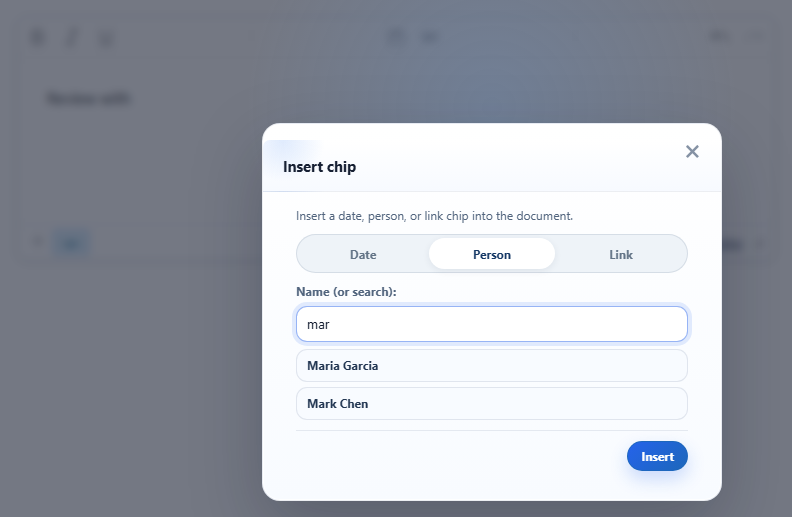
chipResolver.Options
| Option | Default | What it does |
|---|---|---|
chipResolver | null | function (query, type), where type is "person" or "link". Return a Promise of [{ label, value, href }]; up to six are shown as suggestions as the author types. label is the chip text, value is stored in data-rte-chip-value, href is the link address for link chips. |
chipDateFormat | null | function (date) returning the text of a date chip. Without it the text is "Nov 11, 2026" on an English page; with a non-English language pack (text_uilocale) it is that locale's short date from Intl.DateTimeFormat. |
text_insertdatechip, text_insertchip | "Date Chip", "Smart Chip" | Button tooltips. |
var editor1 = new RichTextEditor("#div_editor1", {
  chipDateFormat: function (d) {
    return d.toLocaleDateString("en-GB", { day: "numeric", month: "long", year: "numeric" });
  }
});
With this, the Today button read "4 November 2026" and inserted a chip with that text; the stored value stayed 2026-11-04.
Using it
- Date chip. The Date dialog offers Today, Tomorrow, Yesterday and Next week, each showing its date, and a date field for any other day. The value is always
YYYY-MM-DDin the browser's local time. - Person chip. Type a name and press Insert, or click a suggestion. Without a resolver the typed name is both the label and the value.
- Link chip. Type an address. A bare domain gets
https://;javascript:,data:,vbscript:andfile:addresses are refused and the field asks for a valid http(s) URL. The chip shows the address withouthttps://and opens it in a new tab. - From script:
editor1.execCommand("insertdatechip")andeditor1.execCommand("insertchip")open the dialogs.
Things to know
- The plugin has these three chip types only. There are no file or place chips, and the
iconfield a resolver may return is not used. - A chip is fixed once inserted. Clicking a date chip does not open a picker, and nothing updates the text later (a "Today" chip keeps the date it was made on). To change one, delete it and insert a new one.
- Saved markup, from the picture above (icons shortened):
Each chip is followed by a zero-width space so the caret can sit after it. Read<span class="rte-chip rte-chip-person" data-rte-chip="person" data-rte-chip-value="user:1042" contenteditable="false" style=""><span class="rte-chip-icon"><svg …>…</svg></span><span class="rte-chip-label">Maria Garcia</span></span> <span class="rte-chip rte-chip-date" data-rte-chip="date" data-rte-chip-value="2026-11-11" contenteditable="false" style="">…<span class="rte-chip-label">Nov 11, 2026</span></span> <a class="rte-chip rte-chip-link" data-rte-chip="link" data-rte-chip-value="https://richtexteditor.com/docs/quick-start" contenteditable="false" href="https://richtexteditor.com/docs/quick-start" target="_blank" rel="noopener noreferrer" style="">…<span class="rte-chip-label">richtexteditor.com/docs/quick-start</span></a>data-rte-chipanddata-rte-chip-valueon your server to find who was named or which date was set. - The chip colours are a stylesheet the plugin adds inside the editor only. Add rules for
.rte-chip,.rte-chip-date,.rte-chip-personand.rte-chip-linkto the page that shows the content. - Sanitizers must keep
spanandawithclassand thedata-rte-chip*attributes, plus the small inlinesvgicons (or drop therte-chip-iconspan). - For @-mentions while typing, see mentions.
Related: rich blocks demo, bookmark cards.