Content templates
A dialog that offers ready-made documents you define, such as meeting notes, a bug report or a standard letter. The author picks one from a grid of live previews and it becomes the editor's content.
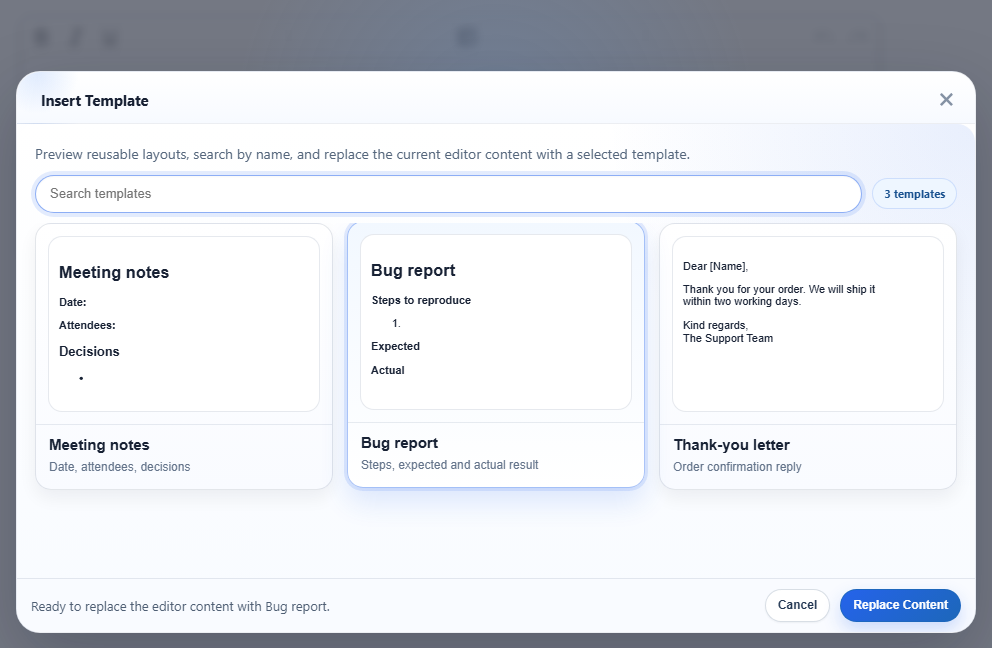
htmlTemplates. "Bug report" is selected; the footer says what Replace Content will do.Turn it on
The feature is the inserttemplate.js plugin (also in plugins/all_plugins.js). The toolbar item is inserttemplate (tooltip "Insert Template"); it is already in the default and full toolbars. The template list is empty until you set htmlTemplates:
<link rel="stylesheet" href="/richtexteditor/rte_theme_default.css" />
<script src="/richtexteditor/rte.js"></script>
<script src="/richtexteditor/plugins/inserttemplate.js"></script>

<div id="div_editor1"><p>Draft notes go here.</p></div>
<script>
var editor1 = new RichTextEditor("#div_editor1", {
  toolbar: "custom",
  toolbar_custom: "{bold,italic,underline}|{inserttemplate}|{undo,redo}",
  htmlTemplates: [
    ["Meeting notes", "<h2>Meeting notes</h2><p><strong>Date:</strong> </p><p><strong>Attendees:</strong> </p><h3>Decisions</h3><ul><li></li></ul>", "Date, attendees, decisions"],
    { title: "Bug report", html: "<h2>Bug report</h2><p><strong>Steps to reproduce</strong></p><ol><li></li></ol><p><strong>Expected</strong></p><p><strong>Actual</strong></p>", description: "Steps, expected and actual result" },
    { title: "Thank-you letter", html: "<p>Dear [Name],</p><p>Thank you for your order. We will ship it within two working days.</p><p>Kind regards,<br>The Support Team</p>", description: "Order confirmation reply" }
  ]
});
</script>
With no templates the dialog opens and says "No templates are available."
Options
| Option | Default | What it does |
|---|---|---|
htmlTemplates | [] | The templates. Each item can be any of the forms below; items without HTML are skipped. |
text_inserttemplate | "Insert Template" | Tooltip of the toolbar button. |
Forms an item can take:
["Title", "<p>html</p>", "description"]: an array; the description is optional.{ title, html, description }: an object.nameortextalso work for the title,contentfor the HTML,metafor the description, andidis kept if you give one."<p>html</p>": a bare string, shown as "Template 1", "Template 2" and so on.
The description is the grey line under the card title. Without one, the card shows the first 80 characters of the template's text, run together with no spaces between paragraphs, so a short description reads better.
The dialog's other words come from language-pack keys: text_tp_copy, text_tp_search, text_tp_replace, text_tp_select, text_tp_ready, text_tp_nomatch, text_tp_none, text_tp_count1, text_tp_countn.
Using it
- Click the toolbar button, or call
editor1.execCommand("inserttemplate"). The slash menu lists it as "Template". - The search box filters by title, description and the template's text. Searching "expected" leaves only "Bug report".
- Click a card to select it, then Replace Content. A double-click applies the template at once.
- Ctrl+Z after applying brings back the document as it was before, including edits made just before.
Things to know
A template replaces the whole document; it is not inserted at the caret. The dialog says so ("replace the current editor content"). To insert a snippet at the caret, use editor.insertHTML() from your own button.
- The template's HTML goes through the editor like any other content. In the run above, the "Bug report" template came out as:
The editor wrote<h2 id="bug-report">Bug report</h2> <p><b>Steps to reproduce</b></p> <ol><li></li></ol> <p><b>Expected</b></p> <p><b>Actual</b></p><strong>as<b>and gave the heading anid. Nothing marks the content as coming from a template. - The previews are the template HTML drawn small inside the dialog, so they use the page's styles, not the editor's content stylesheet.
- Templates live in your page's config. To load them from a server, fetch the list before you create the editor and pass it as
htmlTemplates.
Related: templates demo, setHTMLCode, configuration.